
We make Thrum, one of the five tools in this comparison, so read it with that in mind. We have tried to be fair. Every price and fact about another tool below comes from that tool's site, checked on 15 November 2026, and each tool's weak spots are listed, including ours.
n8n is excellent. It charges by the full run of a workflow (a set of steps that runs by itself), and you can run it on a server you control. But no tool is best at everything. For five specific jobs, five other tools beat it. Thrum is the one built for running automations for clients and showing those clients it works.
First, what n8n is great at
n8n's cloud plans charge per full run of a workflow, however many steps it has, and its pricing page says you pay only when a workflow runs from start to finish. Starter is €20 a month, billed yearly, for 2,500 runs. All plans include unlimited users, unlimited workflows and all the apps n8n connects to. A version you host yourself, the Community Edition, is available on GitHub. Its plans include AI agents, and a person can be asked to approve an agent's action in another app before it happens.
Its plans have nothing for handing work to clients. The pricing page is about building and running workflows, and none of its plans lists a client portal or a report you can send a client.
That is fine for many jobs. For these five, there is a better choice.
1. Thrum: best for running and showing client automations
The job: you build automations for local businesses, and each client needs to see, every month, that the work is being done.
In Thrum, each workflow belongs to a client, and three things come with each client:
- A portal in the client's colours and logo. It shows each enquiry and how fast it was answered. On Agency and Scale, it carries no platform name and can sit on the client's own web address. On Solo, its footer carries a "Powered by Thrum" link and the address is ours.
- A report on the first of the month: four numbers, one chart, one plain sentence. Thrum sends it to the client, and your copy goes with your invoice.
- An alert to you, and only you, when a workflow goes quiet. Thrum learns how often each one normally runs. Three times the usual gap with nothing happening means Stopped, and you get an email. Your client is not told.
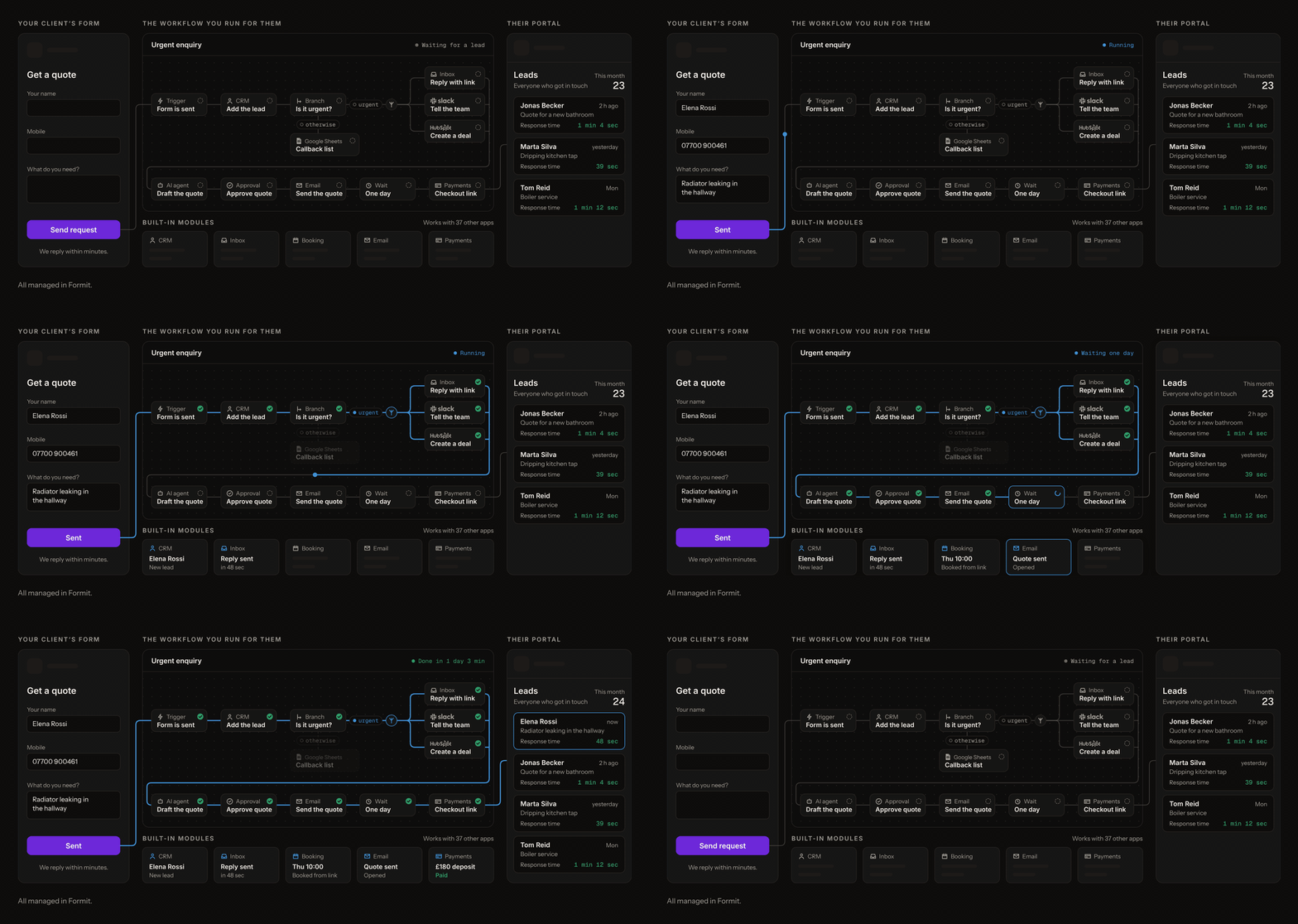
Price: Solo is $20 a seat a month, and each seat carries one client. Agency is $99 a seat a month, with 15 clients a seat, and Scale is $249 a seat a month with no client limit. Every account starts with a 14-day trial for two clients, with no card. Seats set how many clients and workflow runs you carry, and the number of steps in a workflow is not counted.
Where it falls short: Thrum runs its own workflows. It does not watch the ones you already have in n8n or Zapier, though it can import your n8n workflows. It connects to fewer apps than Zapier, because it focuses on what local businesses use: texts, email, customer lists, booking and payments. You cannot host it yourself. Forms are live today. The portal, the monthly report and the alerts are built and not yet used by any customer.
2. Zapier: best for connecting almost any app, quickly
The job: a client uses an unusual app, and you need it connected today.
Zapier says it connects to more than 9,000 apps, and that this is more than any other automation tool. It also has AI agents (on separate plans), Tables for storing data, and Forms.
Price: the Free plan covers 100 tasks a month. Professional starts from $19.99 a month on yearly billing. A task is each action step that runs successfully. The step that starts a workflow does not count, and neither do built-in steps such as Filter, Formatter, Paths and Delay.
Where it falls short: costs rise with every step, so a busy client can get expensive. Past the plan's task limit, Zapier moves you to pay-per-task billing at a higher rate per task, and if you turn that off, your workflows pause until the next usage period starts. Professional is for one person, and the Team plan, for up to 25 users, starts from $69 a month. Zapier Forms can take custom colours and drop the Zapier logo. None of the plans lists a client portal or a monthly report for a client.
3. Make: best for visual workflows and handling failures
The job: a process with several paths, where you decide exactly what happens when a step fails.
Make calls a workflow a scenario. You build it by connecting modules (each module is one step), and the paths data can take are drawn as dotted lines between them. When a step fails, an error handler can retry it, ignore it, or roll back what the earlier steps changed, where those apps support it. Make can also save an unfinished run so you can retry it later (that setting is off until you turn it on).
Make's AI agents can use Make's AI provider on all plans, so you do not need an account with OpenAI or Anthropic. On paid plans you can connect your AI account instead and pay that provider for the AI use.
Price: Make bills in credits, and what a credit costs depends on the plan. Make's pricing page did not load when we checked, so this post gives no Make prices. For most apps, each module run is one credit, so a ten-step scenario uses ten credits each time it runs. AI steps on Make's provider are charged by how much text they read and write.
Where it falls short: paying per step adds up on long workflows. Checking an app for new data counts as an operation too, so a scenario that checks often uses credits even when nothing new has arrived.
4. Activepieces: best for open-source automation you host
The job: you want to host the tool yourself, or start on a free plan with no card.
Activepieces is open source, and all plans, the free one included, can run on its cloud or on servers you run. The Free plan gives 1,000 credits a month for up to 5 users, with no card and no time limit.
Price: Plus is $20 a month for 10,000 credits, then $0.007 a credit. One run costs one credit, however many steps it has. AI steps cost 2, 10 or 20 credits, depending on the model, unless you connect your AI account on Plus or above, which brings each AI step down to 1 credit.
Where it falls short: it connects to fewer apps than Zapier, more than 770 by its count against Zapier's 9,000-plus. Putting it inside your product under your brand (its Embed plan) starts from $36k a year.
5. GoHighLevel: best for local-business marketing in one system
The job: you run marketing for local businesses and want one system for contacts, campaigns, booking, texting and websites.
GoHighLevel says it replaces a business's customer records, funnel builder, email marketing, appointment scheduler, text marketing and review tools. Each client gets a sub-account, and all plans start with a 14-day free trial.
Price:
- Starter: $97 a month for 3 client sub-accounts.
- Unlimited: $297 a month for unlimited sub-accounts, with a desktop app that shows your logo to clients.
- Founder: $497 a month, which adds SaaS mode (selling GoHighLevel to clients as your own software). The page's questions call this the Pro plan.
Texts, calls, email and AI are charged on top.
Where it falls short: most of its core features are marketing tools, such as funnels, ads, social posts, reviews and email and text campaigns. Extras add up. A branded client portal app is $49 a month per sub-account, and the HIPAA compliance add-on is $297 a month. If your work is building automations and proving they run, you pay for a lot you will not use.
Also worth knowing
- AI-first tools. Lindy and Gumloop are built around AI agents. Lindy's paid usage starts at $49.99 per user per month, with 5,000 credits each, and Lindy waits for approval before anything with outside impact, such as sending an email. Gumloop Pro is $37 a month for 20,000 credits, with unlimited seats and a 14-day free trial.
- Tools can disappear. Relay.app shut down in September 2026 and permanently deleted all accounts, workflows and run history. Whatever you choose, keep a written record of what each client's automation does, so you can rebuild it anywhere.
How to choose
- You need one unusual app connected fast: Zapier.
- You need several paths and careful handling of failed steps: Make.
- You want to host it yourself: n8n or Activepieces.
- You run marketing campaigns for local businesses: GoHighLevel.
- You build automations for clients and need them to see it working every month: Thrum.
A sensible setup uses two tools. One handles the odd connection. The other is where each client's work runs, is watched and is shown to them, and that is the job we built Thrum for.
Summary
- Choose by the job. Each tool here beats n8n at one thing.
- For client work, the deciding question is what the client sees and who hears first when something stops.
- Thrum's answer is a portal, a report on the 1st, and alerts that come to you first. Its trade-offs are fewer apps than Zapier, no self-hosting, and a portal, report and alerts that are built and not yet used by any customer.
Checked on 15 November 2026.
Sources
- n8n pricing: https://n8n.io/pricing/
- Zapier pricing: https://zapier.com/pricing
- Make, credits: https://help.make.com/credits
- Activepieces pricing: https://www.activepieces.com/pricing
- GoHighLevel pricing: https://www.gohighlevel.com/pricing
- Lindy pricing: https://www.lindy.ai/pricing
- Gumloop pricing: https://www.gumloop.com/pricing
- Relay.app shutdown notice: https://www.relay.app/


