
Thrum lets you put an AI step, in beta, into any workflow you run for a client, so we spend a lot of time on how AI automations go wrong for small businesses. The best-known failures have one thing in common, which is that the AI was allowed to talk to customers by itself. It made up a price, promised a time nobody agreed to, or invented a policy, and the business paid for it.
This post covers the patterns we recommend: let AI read and sort, let the business's own words do the talking, and put a person in front of anything AI writes to a customer. It also shows how to test an AI step before a real customer sees it, and how Thrum keeps watching it afterwards.
What AI is good at in small businesses
AI is very good at reading messy messages. Customers do not fill in forms neatly. They write "boiler banging no hot water can u come 2day" in the box marked "Address". A person can still understand that, and so can a good AI model.
That makes AI useful for three jobs.
- Sorting. Is this urgent or routine? A new customer or an existing one? A complaint or a question?
- Pulling out details. The name, the postcode, the date they want, the kind of job.
- Summing up for the owner. One line instead of a long email: "New customer, leaking boiler, wants someone today."
In each of these, the AI's answer goes to the workflow or to the owner, and never straight to the customer.
What AI is bad at
AI is bad at facts it was not given. Ask it what a boiler service costs, and if it does not know, it may still give an answer. It will sound confident, and it may be wrong.
This has already cost real companies. In February 2024, a Canadian tribunal ordered Air Canada to compensate a customer after its website chatbot wrongly told him he could claim a bereavement discount after travelling. The tribunal said it makes no difference whether wrong information comes from a page on the website or from a chatbot. OWASP, a security group, now cites the case in its guidance on AI that states false things. In April 2025, an AI support bot at the software company Cursor told customers about a login rule that did not exist, and some users said they were cancelling their subscriptions.
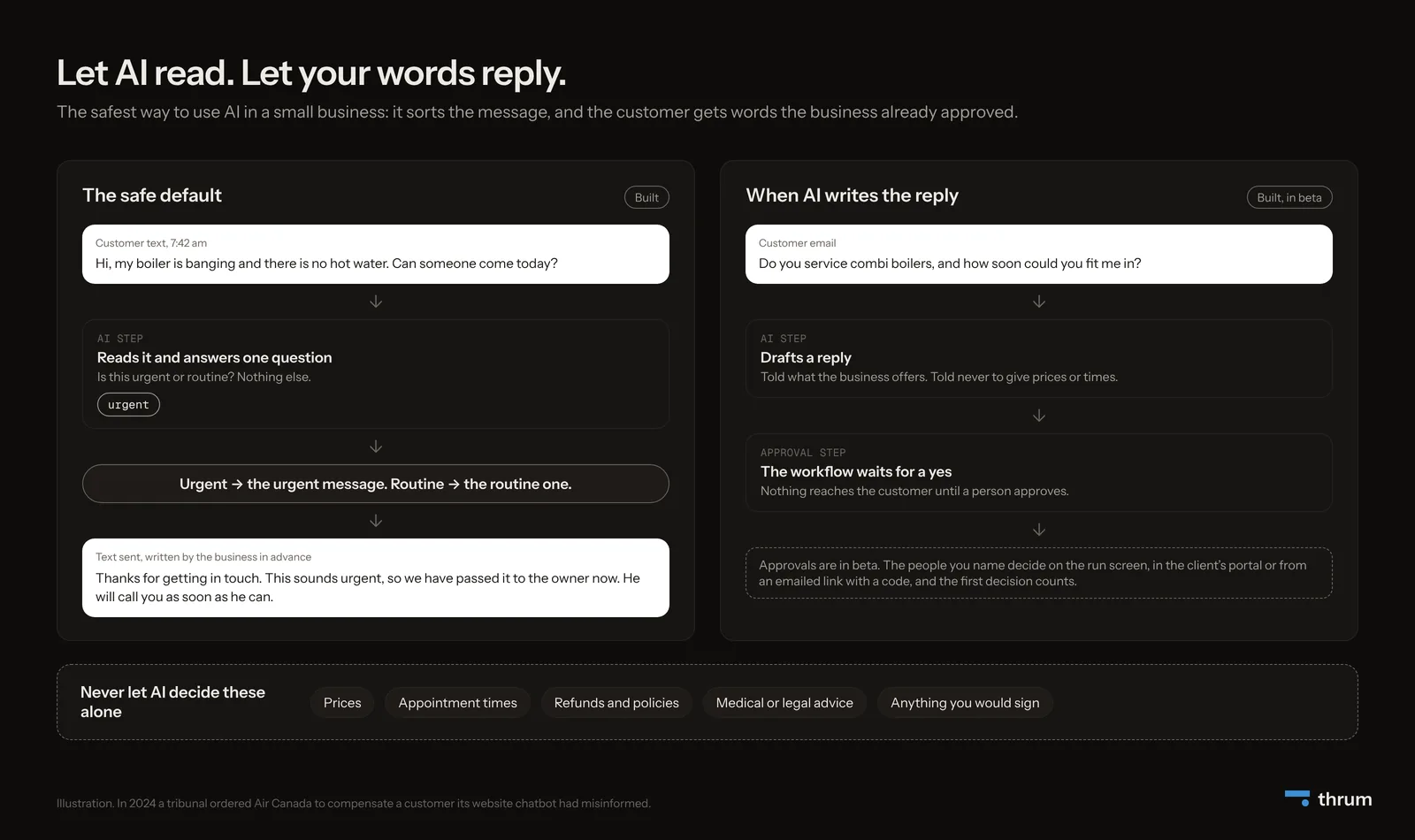
So there is a short list of things AI should never decide alone in a client's business.
- prices
- appointment times
- refunds and policies
- medical or legal advice
- anything the business would have to sign
Start with the simplest thing that works
Anthropic, the company behind the Claude models, published practical advice for building with AI. In short, find the simplest solution that works, and only add complexity when you need it. As it puts it, "This might mean not building agentic systems at all."
The advice separates two approaches.
- Workflows: fixed steps that use AI at certain points.
- Agents: the AI decides its own steps as it goes.
For well-defined jobs, like answering enquiries for a plumber, a workflow is more predictable. Predictable is what a small business owner needs, a system that does the same right thing every time.
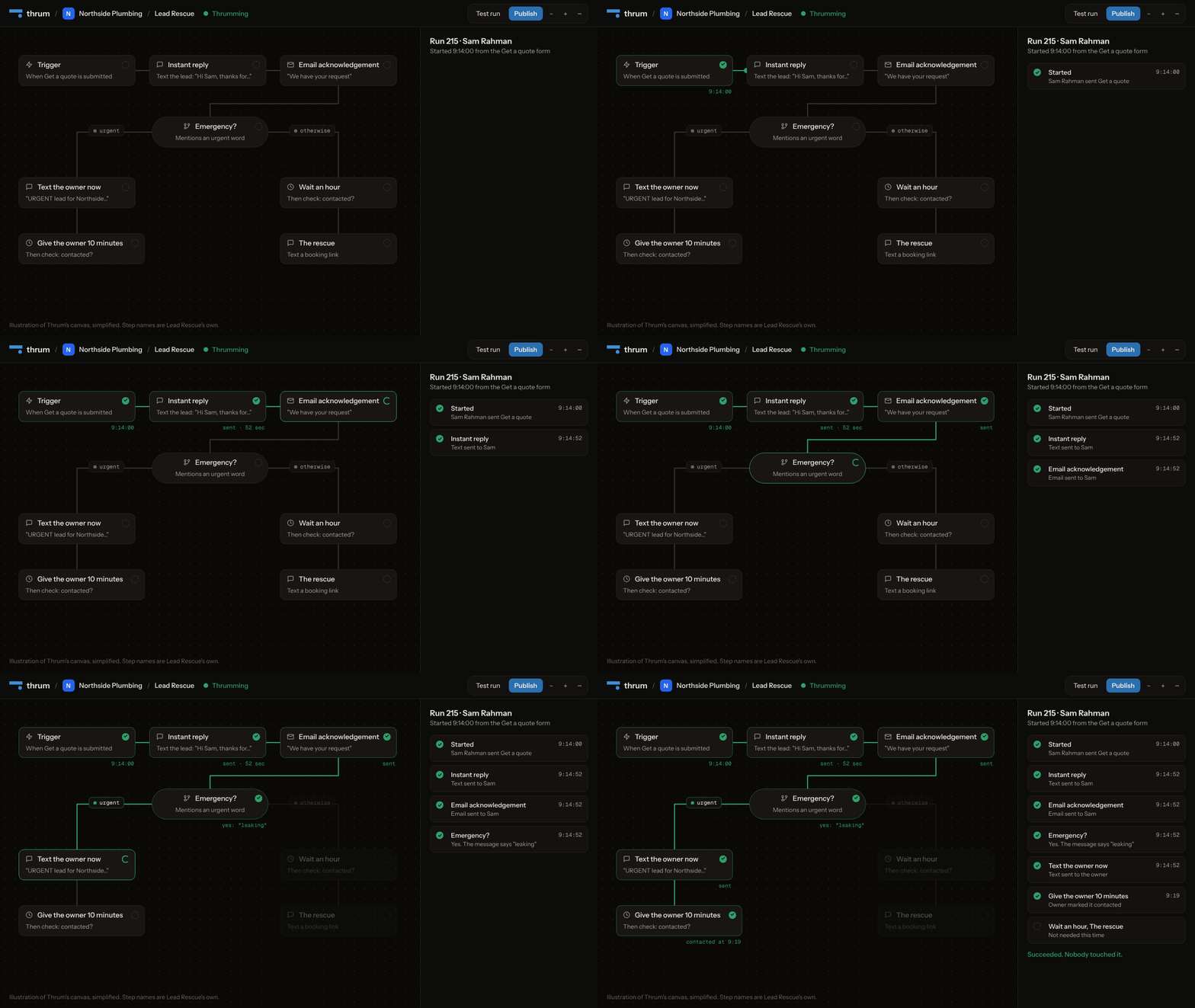
In Thrum: a workflow is a set of fixed steps you can see. The AI step is one step among them, and the path a run takes is always visible.
Pattern 1: AI reads, your words reply
This is the safe default.
- A customer sends a message through the form.
- The AI step reads it and answers one question only, urgent or routine.
- A yes/no step picks the matching message.
- The customer gets words the business wrote and approved in advance.
The customer gets a fast, relevant reply, and the AI never writes a word they see. If it sorts something wrongly, the worst case is that a routine message goes out instead of an urgent one, and the owner still gets the details.
In Thrum: the AI step, which is in beta, works with Anthropic's Claude, OpenAI, OpenRouter or Groq. You choose the model and write its instructions. You can give it a short list of app steps it is allowed to use, and nothing else. Each AI step is capped at 8 calls to the model and 12 uses of those app steps, so one confused run cannot loop or run up a bill.
Pattern 2: AI drafts, a person approves
Sometimes a pre-written message is not enough. A customer asks a specific question, and a tailored reply would win the job.
- The AI drafts a reply. Its instructions say what the business offers and tell it never to give prices or times.
- An approval step pauses the workflow.
- Nothing reaches the customer until a person says yes.
In Thrum: the approval step, which is in beta, stops the run and asks the people you name. They can decide on the run screen, in the client's portal or from an emailed link with a six-digit code. The first decision wins, and the run carries on once.
Pattern 3: AI writes only for the owner
This is the lowest-risk use of AI, and often the most appreciated. The AI turns each enquiry into one line for the owner:
New customer, Sam, boiler leaking under the stairs, wants someone today. Mobile 07700 900123.
The owner reads it between jobs. If the summary is slightly off, nothing bad happens, because the owner calls the customer anyway.
Test it before a customer sees it
Never switch on an AI step on the strength of three test messages.
- Collect 20 real past messages from the business. Remove names and phone numbers first, and get the owner's permission before sending customer messages to an AI provider.
- Run every one through the AI step and write down what it decided.
- Check each answer by hand. If more than one or two are wrong, rewrite the instructions and run all 20 again.
- Decide what happens when the AI is unsure. The safe choice is to treat it as routine and send the details to the owner.
- Keep the instructions short and specific. "Answer only urgent or routine" beats a page of rules.
In Thrum: use Test run on the canvas to try the workflow and see every step's result before you publish.
Watch it after it goes live
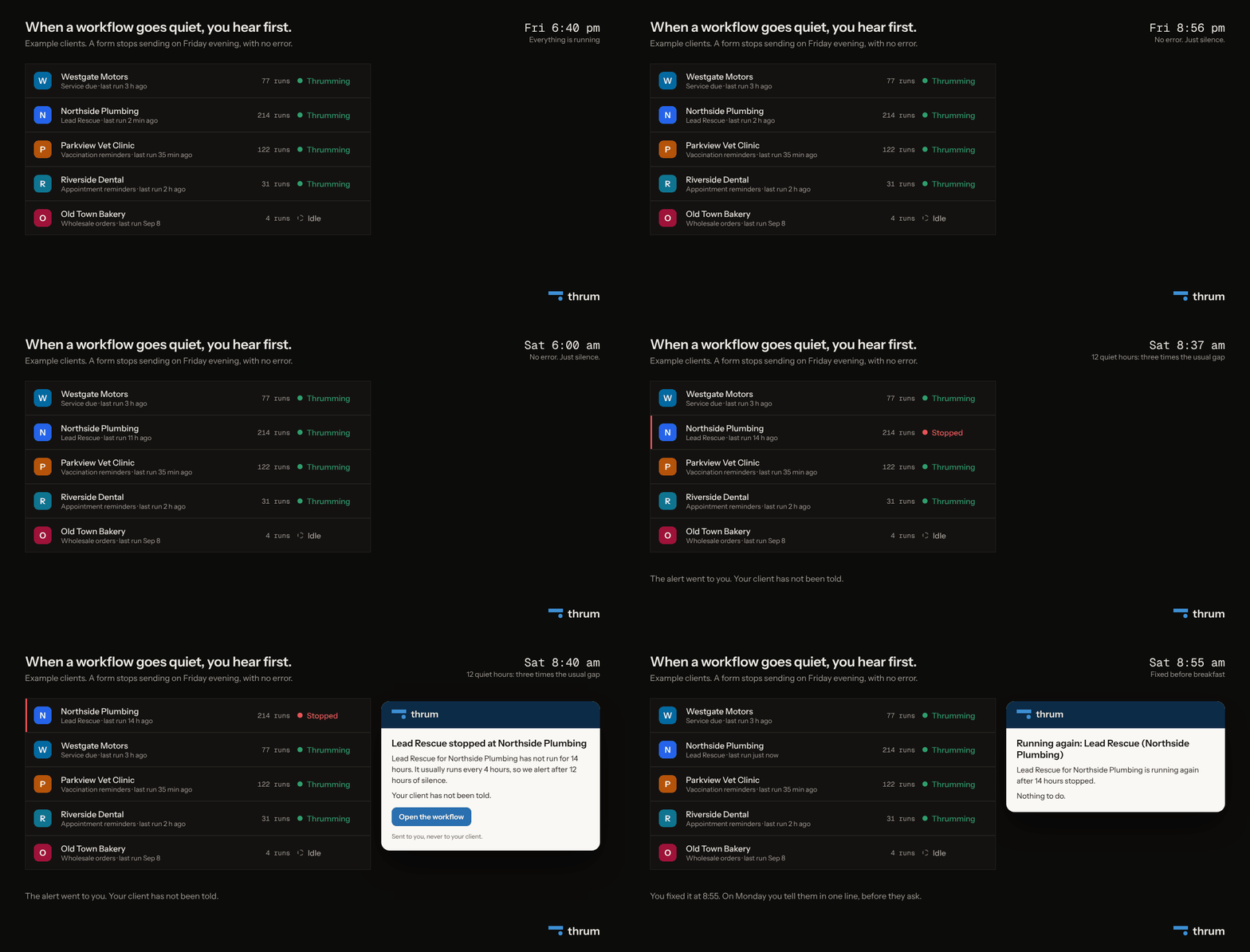
AI steps fail in ways ordinary steps do not. The AI provider can be slow, an account can run out of credit, or the provider can have a bad hour. Your client will not tell you, because the first sign is customers who stop getting replies.
In Thrum: each workflow is watched, including its AI steps. Three failures in a row, a fifth of recent runs failing, or runs taking three times longer than usual moves a workflow to Degraded. If it goes quiet for three times its usual gap, it moves to Stopped and you get an email. The alert goes to you, never to your client.
Summary
- Let AI read and sort. Let the business's approved words reply.
- If AI writes to a customer, a person approves it first. In Thrum that is the approval step.
- Never let AI decide prices, times, policies, or medical or legal questions.
- Test on 20 real messages, decide what happens when it is unsure, and keep watching it after launch.
Sources
- Anthropic, "Building effective agents" (December 2024): https://www.anthropic.com/engineering/building-effective-agents
- Moffatt v. Air Canada, 2024 BCCRT 149, summary: https://www.mccarthy.ca/en/insights/blogs/techlex/moffatt-v-air-canada-misrepresentation-ai-chatbot
- AI Incident Database, Cursor support bot (April 2025): https://incidentdatabase.ai/cite/1039/
- OWASP Top 10 for LLM Applications, LLM09 Misinformation: https://owasp.github.io/www-project-top-10-for-large-language-model-applications/2_0_vulns/LLM09_Misinformation.html


