
Small business owners pay to stop losing customers, chasing money and filling empty appointment slots by hand. Each automation below fixes one of those, and six of the seven are a handful of steps you can build in Thrum.
For each one we cover what it fixes, the steps, how the owner sees it working, what to watch out for, and how it is set up in Thrum. Start with the one that hurts your client most.
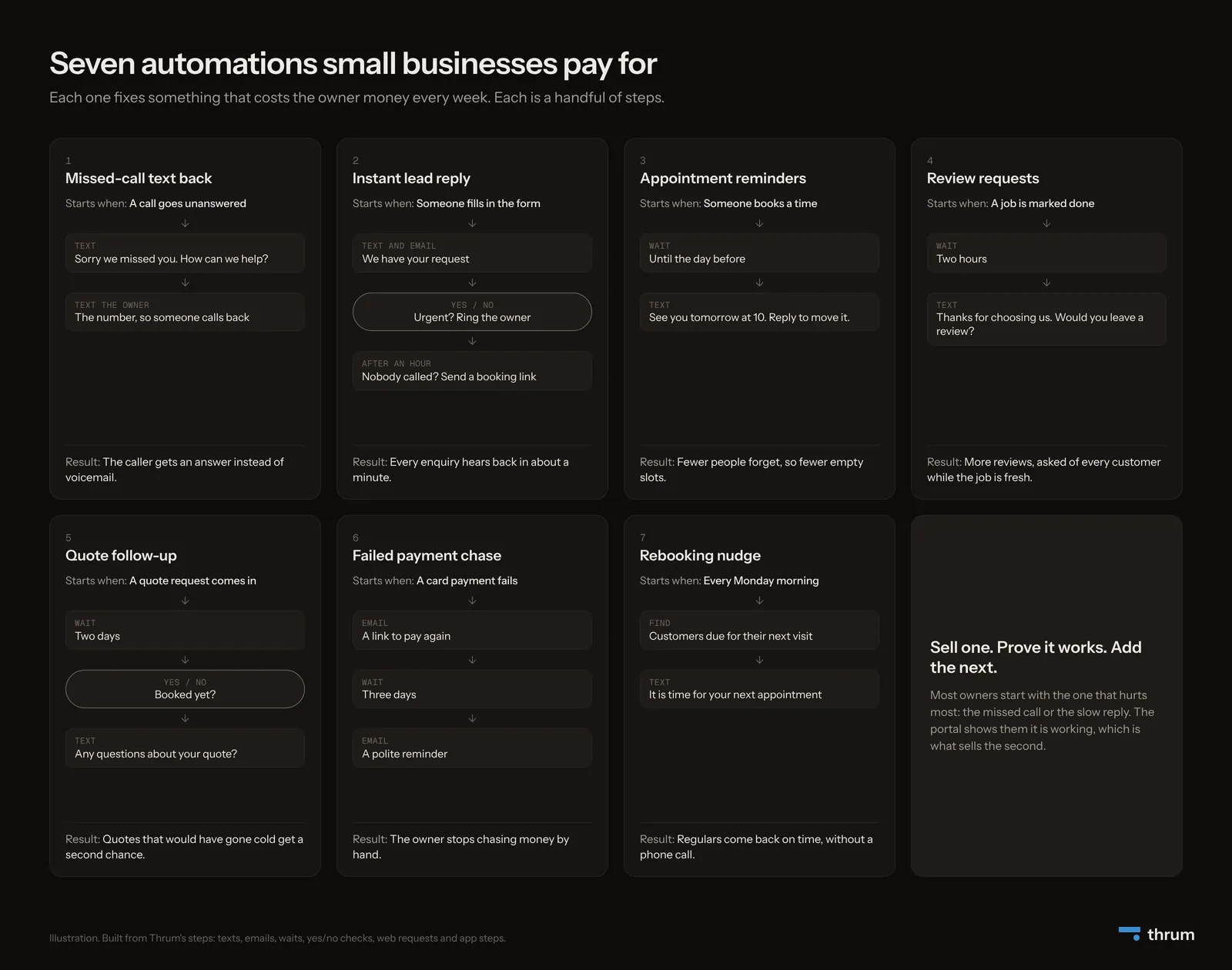
A quick word on terms. A workflow is a set of steps that runs by itself. It starts when something happens, such as a form being sent, a payment failing or a set time arriving.
1. Missed-call text back
What it fixes: calls missed while the owner is on a job. Many callers will not leave a voicemail. They ring the next business on the list.
The steps:
- A call goes unanswered.
- The caller gets a text: "Sorry we missed you. How can we help?"
- The owner gets a text with the caller's number, so someone can call back.
How the owner sees it: a text for each missed call, with the caller's number, so nothing slips.
Watch out for: landlines. A text to a landline goes nowhere, so the owner still needs the number to call back.
In Thrum: this is the one automation here that Thrum does not run, because Thrum does not handle phone calls and so cannot tell when one is missed. Build it in the client's phone system, if it offers a missed-call text.
2. Instant lead reply
What it fixes: slow replies to website enquiries. People who contact a business online often ask several at once, and the first to reply often wins. A 2011 Harvard Business Review analysis of 1.25 million leads found that firms that tried to reach a lead within an hour were nearly seven times as likely to have a real conversation as those who tried even an hour later.
The steps:
- The customer gets a text, and an email if they gave one, within about a minute. Texts wait out the night, so an enquiry sent between 21:00 and 08:00 is answered at 08:00.
- If the message has an urgent word in it ("leak", "burst", "no heat"), the owner's phone gets a text with the details.
- If nobody marks it contacted within 10 minutes, the text goes to a backup number, if you set one.
- Anyone not contacted within an hour gets a friendly text with a booking link.
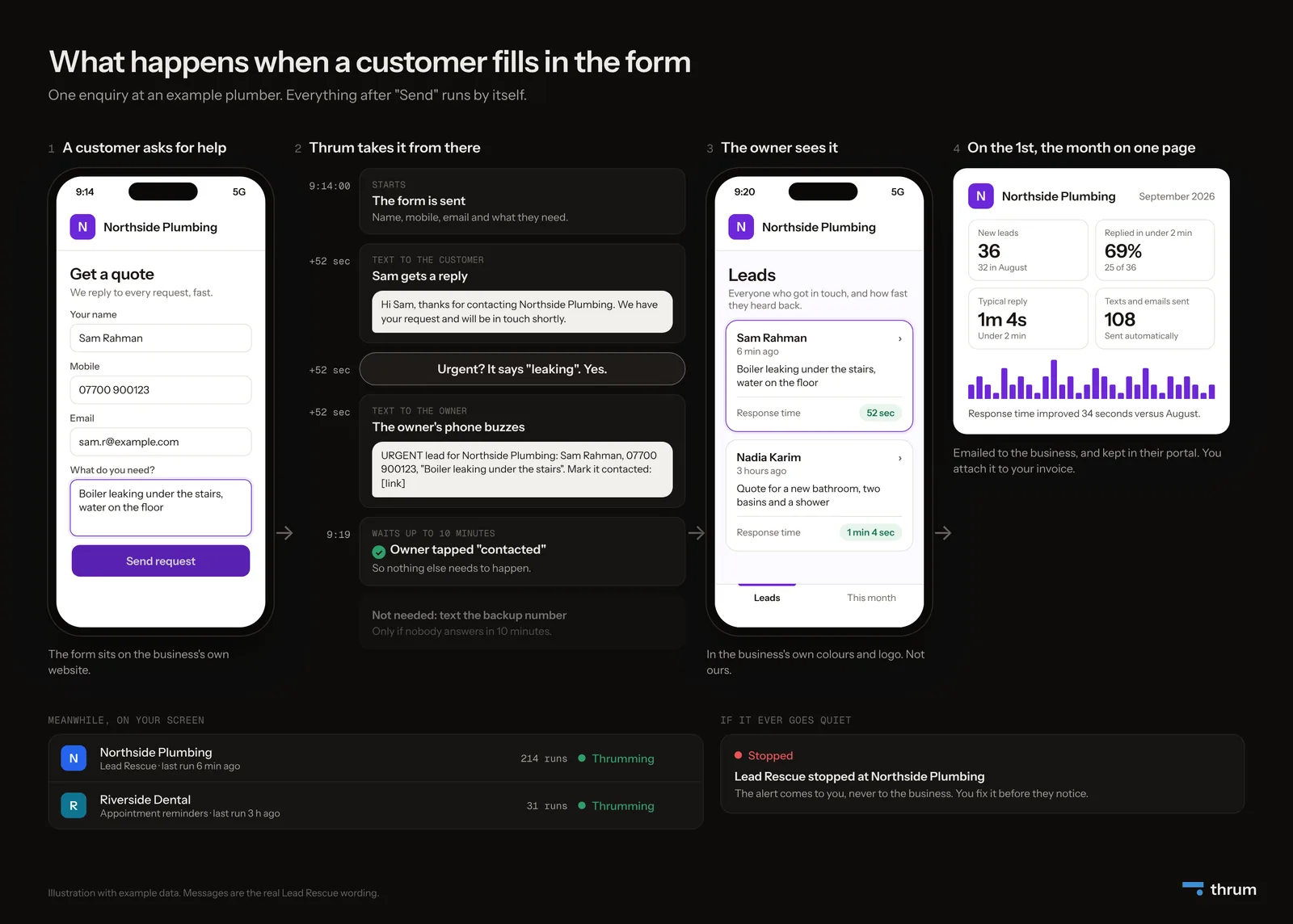
How the owner sees it: each enquiry, and how fast it was answered, on their phone.
Watch out for: the urgent words. Agree them with the owner, and keep the list short. Too many, and all enquiries look like emergencies.
In Thrum: this one comes ready-made as the Lead Rescue template. You fill in five details for each client: business name, owner's mobile, owner's email, urgent words and booking link.
3. Appointment reminders
What it fixes: people who forget their appointment, leaving an empty slot nobody can fill.
The steps:
- Someone books.
- The workflow waits until the day before.
- It sends a text: "See you tomorrow at 10. Reply to change the time."
How the owner sees it: reminders sent this month, in the monthly report.
Watch out for: changes. Check what the booking app sends when someone moves a booking, so a reminder never goes out for the old time.
In Thrum: it can start when "Someone books a meeting" in Calendly, or when a new booking comes in through Square.
4. Review requests
What it fixes: happy customers who never leave a review because nobody asked at the right moment.
The steps:
- A job is marked done.
- The workflow waits two hours.
- It sends a text: "Thanks for choosing us. Would you leave a review?" with the link.
How the owner sees it: requests sent, next to the reviews they can see coming in.
Watch out for: picking who to ask. Ask each customer once the job is done. If something went wrong, fix it first, but do not filter who gets asked, because Google's review rules do not allow that.
5. Quote follow-up
What it fixes: quotes that go quiet. The customer meant to reply and forgot.
The steps:
- A quote request comes in through the form.
- The workflow waits two days.
- A yes/no step checks whether they have booked.
- If not, it sends a text: "Any questions about your quote?"
How the owner sees it: follow-ups sent, and which of those people booked.
Watch out for: nagging. One friendly nudge is helpful. Three is a reason to block the number.
6. Failed payment chase
What it fixes: owners spending evenings chasing money.
The steps:
- A card payment fails.
- The customer gets an email with a link to pay again.
- The workflow waits three days.
- If it is still unpaid, a polite reminder goes out.
How the owner sees it: fewer awkward phone calls, and payments arriving without them asking.
Watch out for: tone. Many failed payments come from an expired or replaced card, so write it as a friendly note about the card.
In Thrum: it starts when Stripe reports "A payment fails", and a step makes the payment link.
7. Rebooking nudge
What it fixes: regular customers who drift away. Salons, vets, dentists and garages all depend on people coming back on time.
The steps:
- Every Monday morning, the workflow starts by itself.
- It finds customers whose last visit was long enough ago, from the business's booking app or customer list.
- It sends each one a text: "It is time for your next appointment."
How the owner sees it: rebookings that happened without anyone picking up the phone.
Watch out for: people who have moved on. Include an easy way to say "no thanks", and stop texting them when they do.
In Thrum: a schedule starts it weekly, at a time in the client's own time zone.
Before you switch any of these on
Six of the seven send texts. If the business is in the US and texts from a normal local phone number, three rules apply.
- Register the number first. This is called A2P 10DLC registration. Since September 2023, Twilio blocks texts from unregistered local numbers to US phones, and checks take about 7 business days, or up to 10 when Twilio is busy.
- Only text people who asked to hear from the business, for example by filling in the form. For missed-call texts, check with a lawyer whether a call counts as consent. Review requests and rebooking texts may count as marketing, which needs stronger, written consent.
- Let people reply STOP. Twilio handles STOP and similar words by default. Stop texting them when they do.
None of this is legal advice. Use it as a list of what to check before a client's first text goes out.
How these are built in Thrum
Every automation above except the missed-call text is built from the same small set of steps, which are texts, emails, waits, yes/no checks and app steps in apps such as Calendly, Square, Stripe, HubSpot and Google Sheets. Lead Rescue comes ready-made. You build the others once on the canvas, save them as templates, and reuse them for each client.
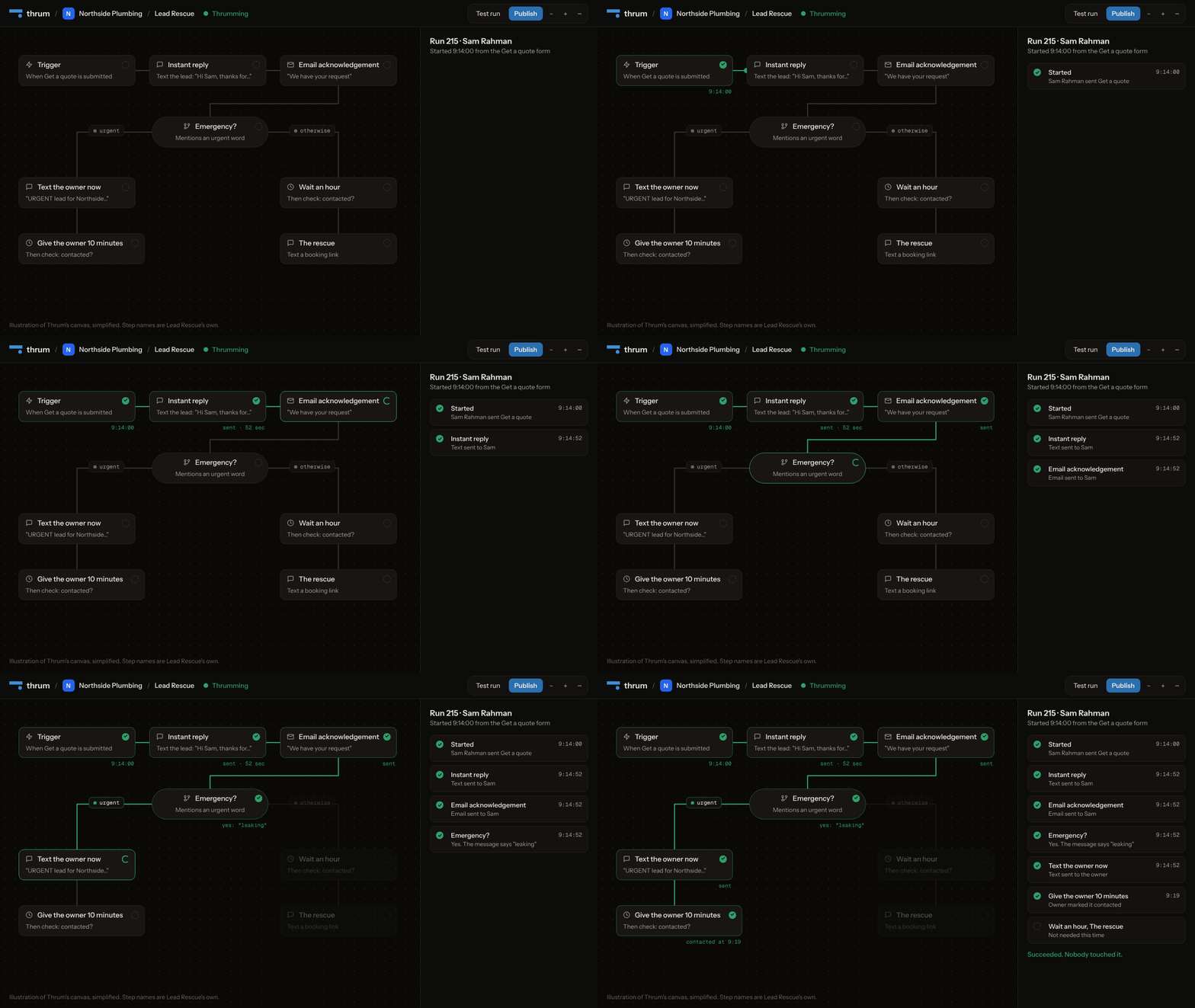
Thrum then does the part that keeps the client paying.
- It watches every workflow. If one goes quiet or starts failing, you hear first. Your client is not told.
- It shows the client the results in a portal in their colours, which on Agency and Scale can sit on your web address or theirs.
- It sums up the month on the 1st, on one page.
Forms are live today, and the rest of Thrum is built and not yet used by any customer.
Which one to sell first
Ask the owner one question: "Where do you lose customers or money every week?"
- "We miss calls on jobs." Sell number 1.
- "People fill in the form and go elsewhere." Sell number 2.
- "No-shows." Sell number 3.
- "We have hardly any reviews." Sell number 4.
Sell one, show it working for a month, then offer the next. A client who can see the first one working is the easiest person to sell the second one to.
Summary
- Each automation fixes one weekly cost: missed calls, slow replies, no-shows, few reviews, cold quotes, unpaid invoices, lapsed regulars.
- Each is a handful of steps. In Thrum, Lead Rescue is ready-made, and the others, apart from the missed-call text, are built once and reused as templates.
- Check the texting rules before the first text goes out.
Solo is $20 a seat a month, and each seat carries one client. Every account starts with a 14-day trial for two clients, with no card.
Sources
- Twilio, A2P 10DLC: https://www.twilio.com/docs/messaging/compliance/a2p-10dlc and https://support.twilio.com/hc/en-us/articles/1260800720410-What-is-A2P-10DLC
- Twilio, full blocking of unregistered traffic: https://www.twilio.com/en-us/changelog/-u-s--a2p-10dlc--full-blocking-of-traffic-sent-from-unregistered
- Twilio, opt-out keywords: https://www.twilio.com/en-us/blog/insights/best-practices/update-to-fcc-s-sms-opt-out-keywords
- 47 CFR 64.1200 (TCPA rules): https://www.ecfr.gov/current/title-47/section-64.1200
- Oldroyd, McElheran and Elkington, "The Short Life of Online Sales Leads", Harvard Business Review, March 2011: https://hbr.org/2011/03/the-short-life-of-online-sales-leads (figures as quoted in https://customerthink.com/how_fast_are_you/)


