Set up a client by briefing Claude
Connect Thrum to Claude once. Paste a client’s brief, and Claude builds their portal, intake form, booking page, pipeline and first workflow in your workspace.
Beta. On every plan, trial included. Needs early access until Thrum opens.
Thrum opens soon. Sign up now and you’ll be among the first in.
Claude
I’ll add the client and brand their portal.
Then a consultation form, the booking page and a pipeline.
I’ll draft the follow-up workflow and check every step.
Last, links for you to connect Stripe and HubSpot.
7 of 7 set up
create_clientupdate_client_portalform_createbooking_upsert_servicebooking_set_hourscrm_create_listworkflow_save_draft“New lead follow-up” saved as a draft, switched off.
Stripe connects in Thrum. The key never enters the chat.
This workflow reaches people, so you publish it.
Paste a client’s brief
⌘VOne brief. The client’s workspace, built.
Enabled — new events start runs

create_client
form_create
booking_upsert_service

crm_create_list


workflow_save_draft
Real screens from one brief’s run.
Each step lands in your workspace
Claude calls the same actions as Thrum’s own screens, as you, within your role and plan.
The client’s portal
A client workspace with its own portal, in the client’s name, brand colour and time zone.
create_clientupdate_client_portal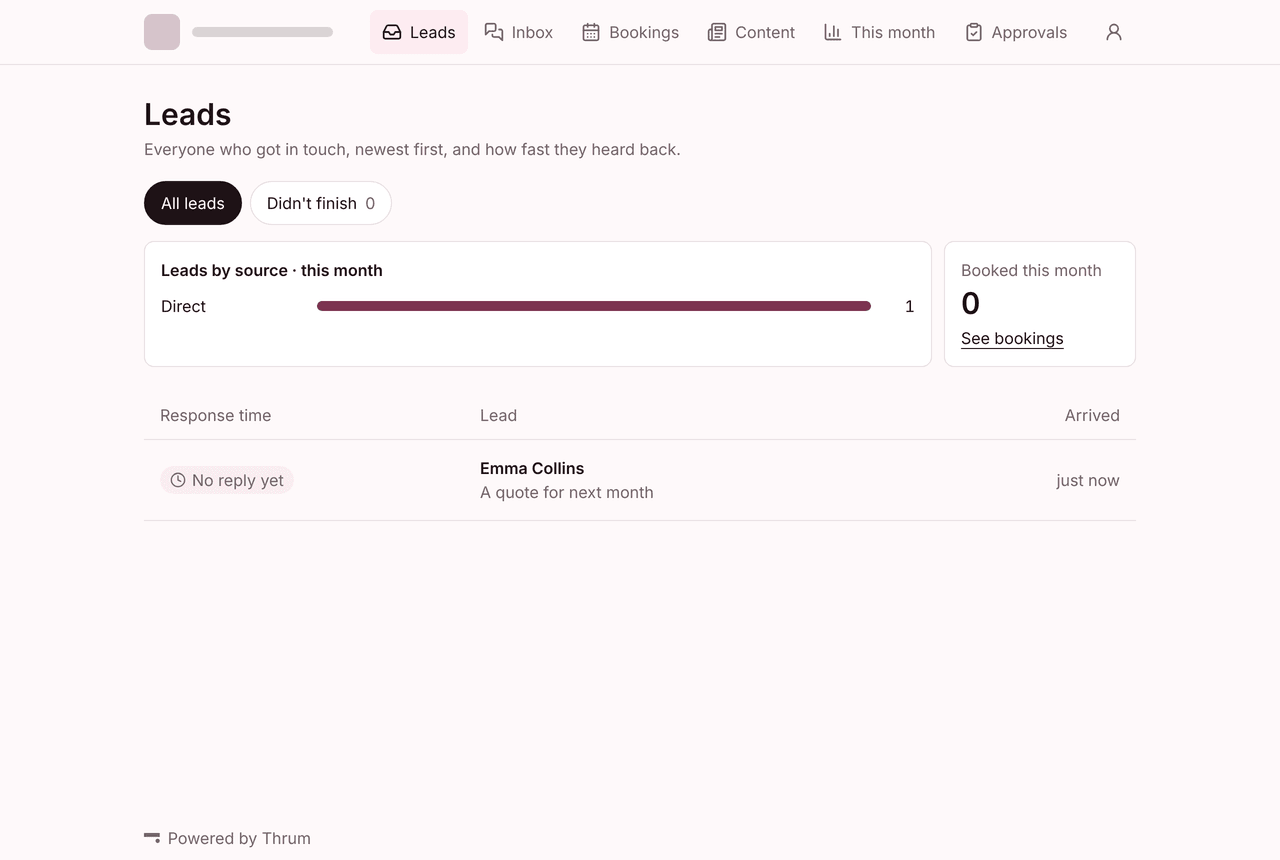
The intake form
A form made from the closest template in the library, kept as a draft until you publish it.
form_create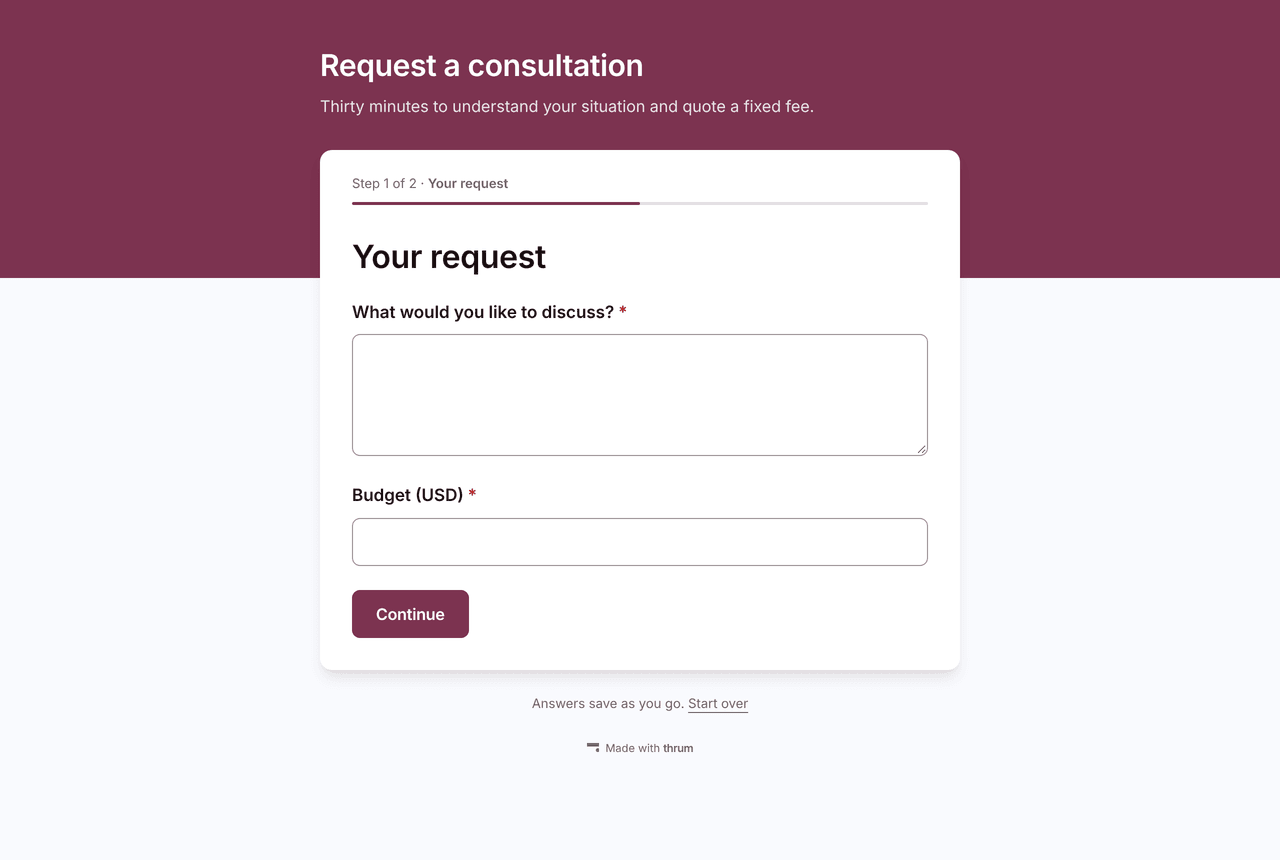
The booking page
A 30-minute consultation, and the weekly hours it can be booked in.
booking_upsert_servicebooking_set_hours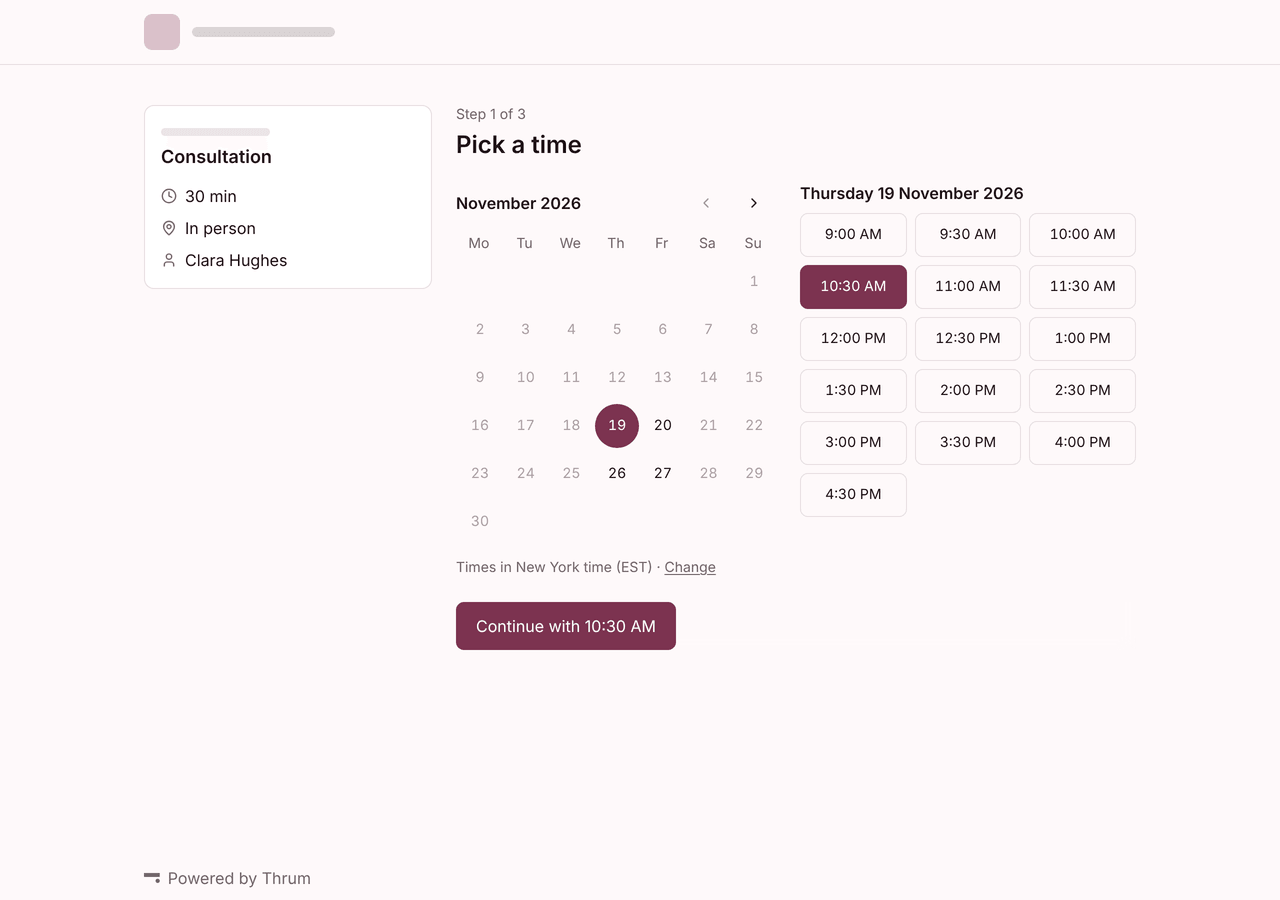
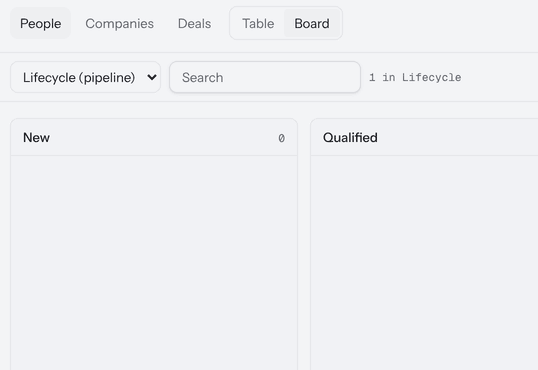
The pipeline
A Lifecycle pipeline for the client’s leads, with the stages New, Qualified, Booked, Won and Lost.
crm_create_list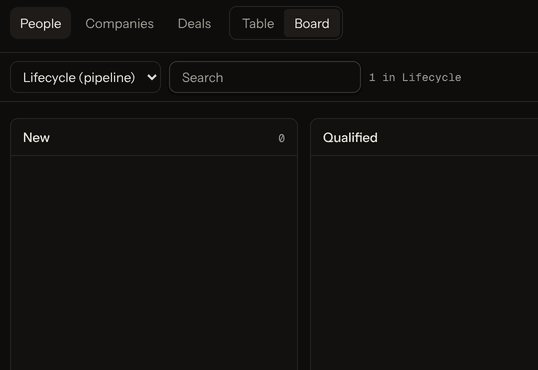
The first workflow
Built from the canvas’s own steps and saved switched off, for you to check and switch on.
workflow_save_draft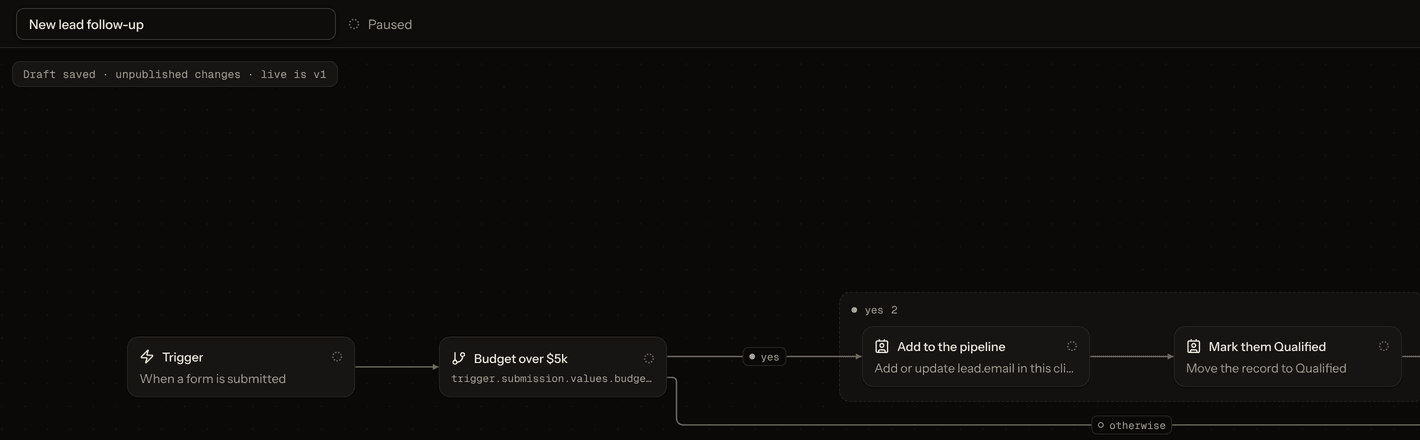
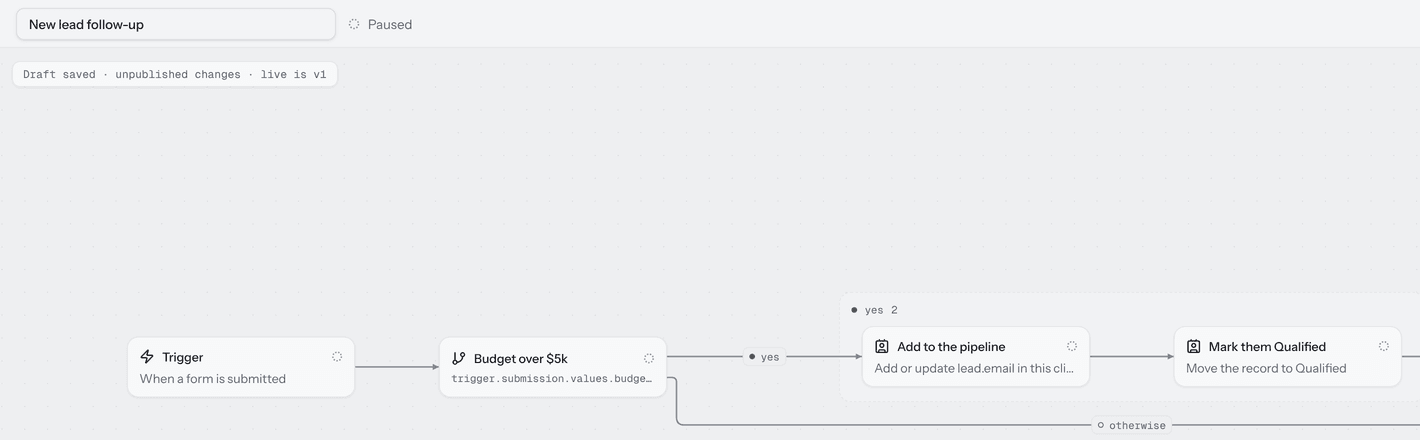
Scroll sideways to follow the workflow.


Each change is made as you, and Settings › Security › AI connections lists it under Claude, most with Undo.
Run the week from the same chat
Ask in plain words. Claude reads and changes your clients’ workspaces from the chat you set them up in.
“Which workflows failed in the last 7 days?”
overview_getResult: 1 failing: “New lead follow-up”, 1 failed run: Reply to the lead failed after 1 attempt.
“Move Emma Collins to Booked.”
crm_update_recordResult: Emma Collins moved to Booked on Lifecycle.
“Draft replies to today’s new leads.”
inbox_draft_replyResult: 4 replies drafted and checked; nothing stored or sent. You send each from the Inbox.
“Schedule a post for next Tuesday at 9:00.”
content_add_postsResult: 1 post scheduled for Tuesday at 9:00, client time, on LinkedIn.
Claude works inside your rules
View only until you choose
Claude starts on View only and changes nothing until you choose View and change, on the consent page or later in Settings.
Four switches, off until you turn them on
Send to people, Remove and restore, Team and access, and Billing and money. Each needs its own “I understand”.
Sends wait 60 seconds, removals 30 days
Each send Claude makes waits 60 seconds so you can undo it. What it removes goes to Trash and can be restored for 30 days.
Keys never enter the chat
Claude never sees or asks for a key. It hands you a one-time link, good for 15 minutes, and you enter the key in Thrum.
Pause Claude stops everything at once
One switch in Settings › Security › AI connections stops all changes from all AI apps at once. Reads still work.
Thrum names the app and refuses look-alikes
The consent page names the app asking by where its sign-in returns, never by the name it gives. An unknown app calling itself Claude is refused.


Connect in two steps
The address to add:
https://app.thrum.run/api/mcp- 1
Add Thrum to Claude
claude.ai
Customize › Connectors › Add custom connector
Name it and paste the address above. Claude Desktop and the mobile apps use the same connectors.
Claude Code
claude mcp add --transport http thrum https://app.thrum.run/api/mcpThen run /mcp in Claude Code to sign in.
- 2
Sign in and choose what it may do
Claude opens Thrum’s consent page. Sign in, pick the workspaces Claude may reach and what it may do there, and press Allow.
Custom connectors are available on Claude’s Free, Pro, Max, Ultra, Team and Enterprise plans, with Free limited to one custom connector. On Team and Enterprise, an Owner adds it first under Organization settings › Connectors. Claude’s help page
Questions about Thrum for Claude
Can I use Claude with Thrum?
Yes. Add Thrum as a custom connector in claude.ai, Claude Desktop or Claude Code, sign in, and choose the workspaces Claude may reach and what it may do. It is in beta, on every plan, trial included.
What does Claude see?
Only what you ask it to read, in the workspaces you chose. What it reads goes to Claude’s provider, under their terms, as section 5 of the privacy policy says. Read section 5
Can Claude send emails or delete things?
Only once you turn on Send to people, or Remove and restore. Each send waits 60 seconds so you can undo it, and what Claude removes stays in Trash for 30 days. Emptying Trash is yours alone.
Does it cost extra?
No. It comes with each plan, trial included, and what Claude does counts as if you did it on the screens. Claude’s usage is on your Claude plan.
What if Claude gets something wrong?
Most changes have Undo in Settings › Security › AI connections, which lists each call. What it removes waits in Trash for 30 days, and Pause Claude stops every change at once.
Thrum is cooking.
Get early access and you’ll be among the first in. Early members get a launch perk.