
Thrum is a client delivery platform for people who sell automation to small businesses. We designed it so that the whole relationship with a client lives in one place and runs by itself, from the proposal they sign to the invoice they pay. A person steps in at four moments, for decisions and fixes.
This post walks through that loop stage by stage, with the screens. It also says plainly what is live today, what is built, and what is built but has not yet run with a real client.
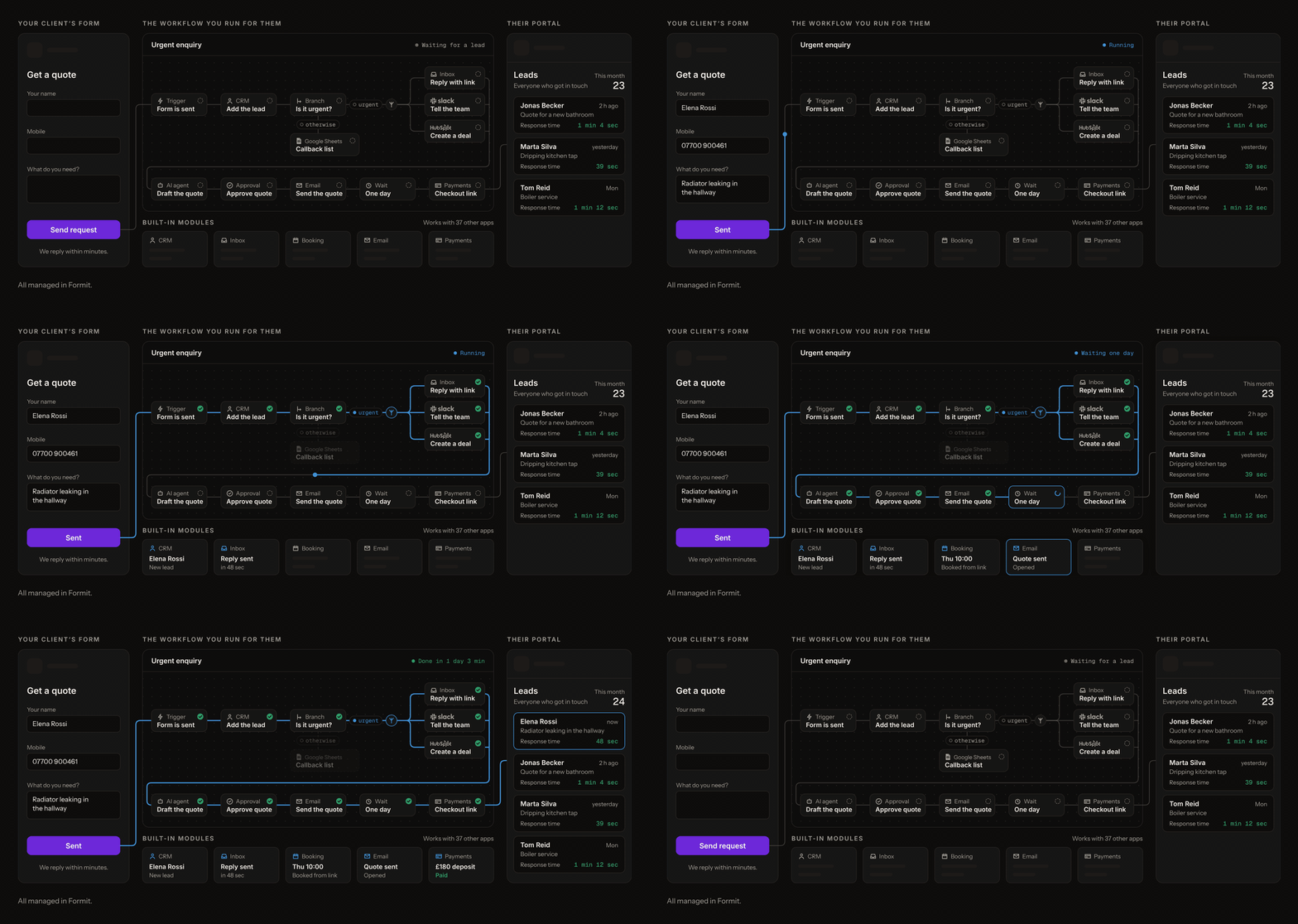
The four moments a person steps in
Even a fully automated loop needs people for decisions and fixes, while the copying of details between screens runs by itself. In Thrum, you step in four times.
- You write the proposal and send the link. The scope and the price are yours.
- You add the client's account details and switch the workflows on. A workflow is a set of steps that runs by itself. The details are things like their texting account and their email sender.
- You tell the client where their portal is. One web address. They sign in with a link sent to their email.
- You answer the alert. When something goes quiet, a person fixes it. Thrum makes sure that person is you, and that you hear first.
Everything between those four runs by itself, month after month.
Stage 1: the proposal is signed
Status: built, not yet run with a client.
You write the proposal in Thrum and send the client a link. They read it without making an account. To accept, they enter a six-digit code sent to the email address you sent it to.
Thrum keeps a record of who signed and when, the exact text they saw, and the agreement PDF itself. If you edit a sent proposal, the old link stops working and the proposal goes back to draft, so the new version goes out under a new link. Nobody ever signs terms that changed under them. A proposal stays open for 30 days unless you choose otherwise.
Stage 2: the client's side sets itself up
Status: built, not yet run with a client.
The moment the client accepts, Thrum creates their side in one step.
- their workspace, at the portal address the proposal reserved
- the forms and workflows you chose for this kind of client, switched off
- a request for each account the client has to supply
- a portal sign-in for their email
- the signed agreement, filed in their workspace
If your plan is full when they sign, their signature still stands. The proposal waits as "signed, not set up" and finishes setting up once there is room. The client never sees your billing.
Stage 3: account details in, switched on
Status: built. This is your second moment.
Nothing runs until it has what it needs. For each client, Thrum lists what is missing. Usually that is the key to their texting account and, if they have one, a link to their customer list or spreadsheet.
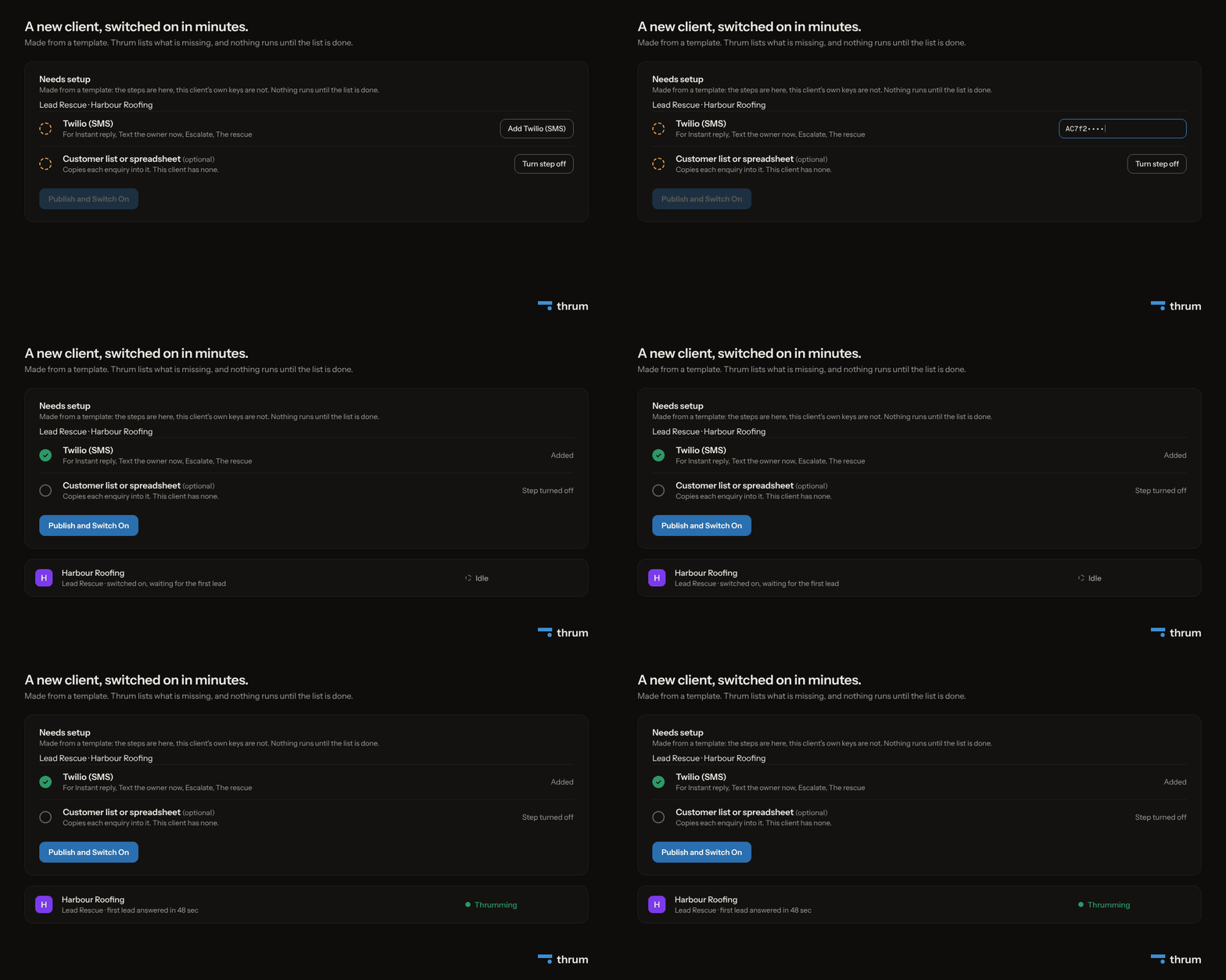
This is deliberate. A half-set-up workflow that texts a real customer is worse than one that never runs. When the list is done, you press Publish and Switch On. The workflow shows Idle (nothing has come in yet) until the first enquiry arrives, then Thrumming (running normally).
Stage 4: a customer fills in the form
Status: live.
The client's customer fills in a form on the business's website, such as a quote request, a booking or a call-out. Forms can sit inside the page, open from a button, or take a whole page. However the questions are worded, the workflow picks out the same four things, which are the customer's name, email, phone and what they need.
Forms are the part of Thrum that is live today.
Stage 5: Lead Rescue runs
Status: built.
The form starts the workflow. Lead Rescue is the ready-made template most people start from, and it shows what "runs by itself" means in practice.
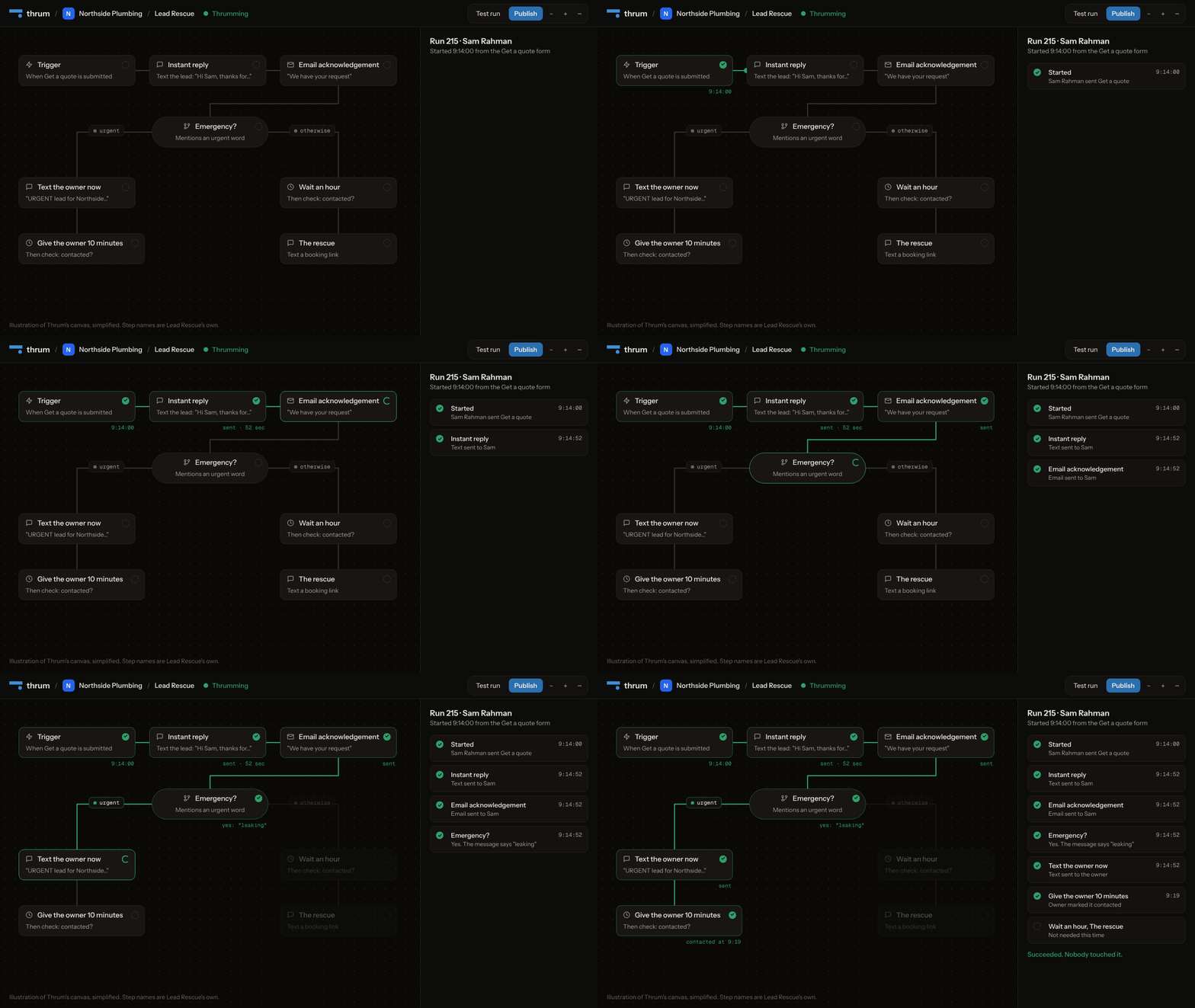
- The customer gets a text within about a minute, and an email if they gave one. Texts wait out the night, so an enquiry that arrives between 21:00 and 08:00 is answered at 08:00.
- The details are copied to the client's customer list or spreadsheet, if they have one.
- If the message uses one of the client's urgent words (leak, burst, no heat), the owner gets a text with the details. If nobody marks the enquiry contacted within 10 minutes, the text goes to a backup number, if you set one.
- Otherwise, Thrum waits an hour. If nobody has been in touch by then, the customer gets a text with a link to book, and the owner gets one line by email for each enquiry that was rescued.
Five details make it one client's: business name, owner's mobile, owner's email, urgent words and booking link. The checks look at the latest state. If the owner marks an enquiry contacted from his phone during a wait, the run sees it and stops, so nobody gets texted twice.
Stage 6: the client sees it
Status: built. This is your third moment.
In Thrum, your client gets a portal in their own colours, with their logo, so they never have to open an automation tool. On Agency and Scale it can sit on your web address or theirs, and our name appears nowhere in it.
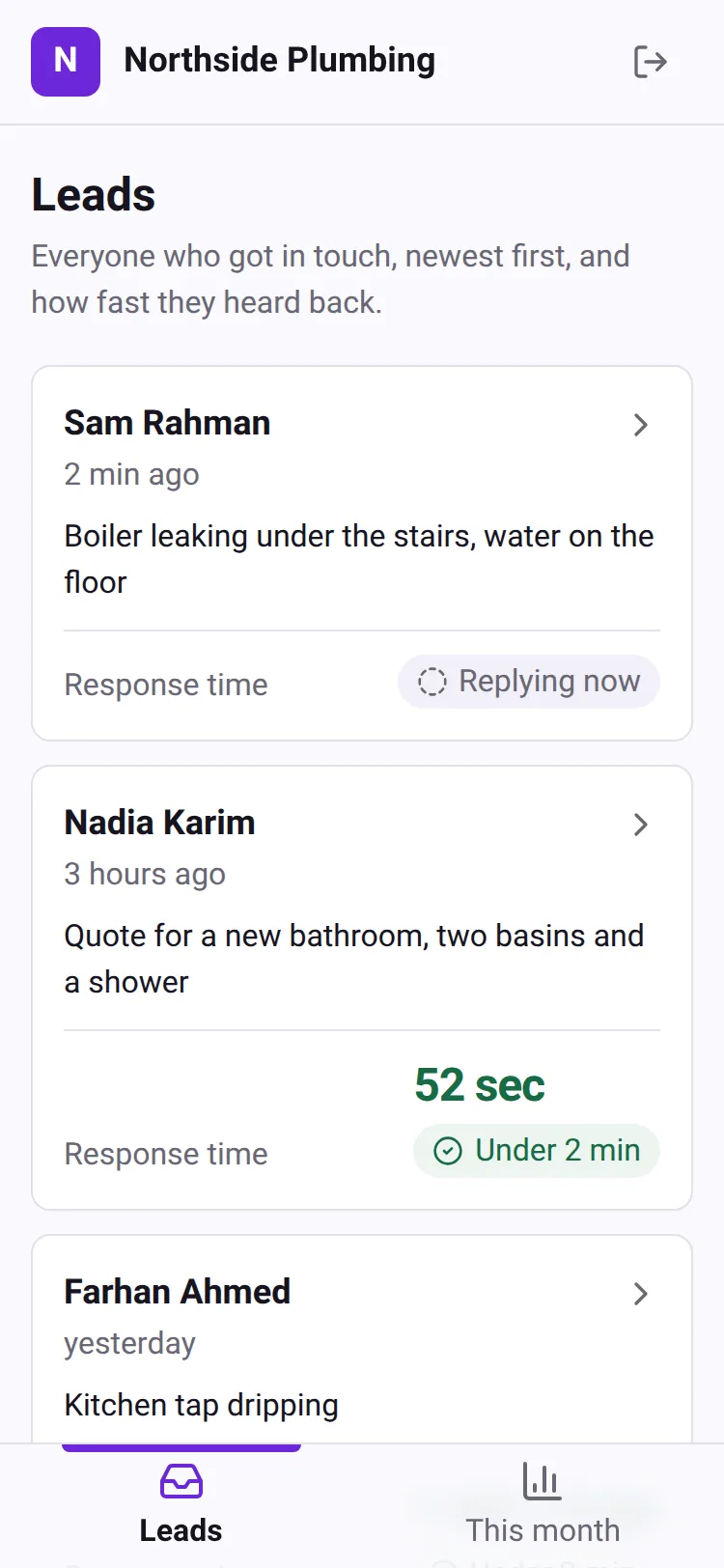
It opens on two screens, who got in touch and how the month went, and shows only what the client has, so a client with bookings or an inbox sees those too. No technical words, no codes. To the owner it reads as a list of their customers and how quickly each one heard back.
Health watches stages 4 to 8 throughout
Status: built. This is your fourth moment.
In Thrum, health runs alongside each stage. All your clients' workflows sit on one screen, with anything Stopped at the top.
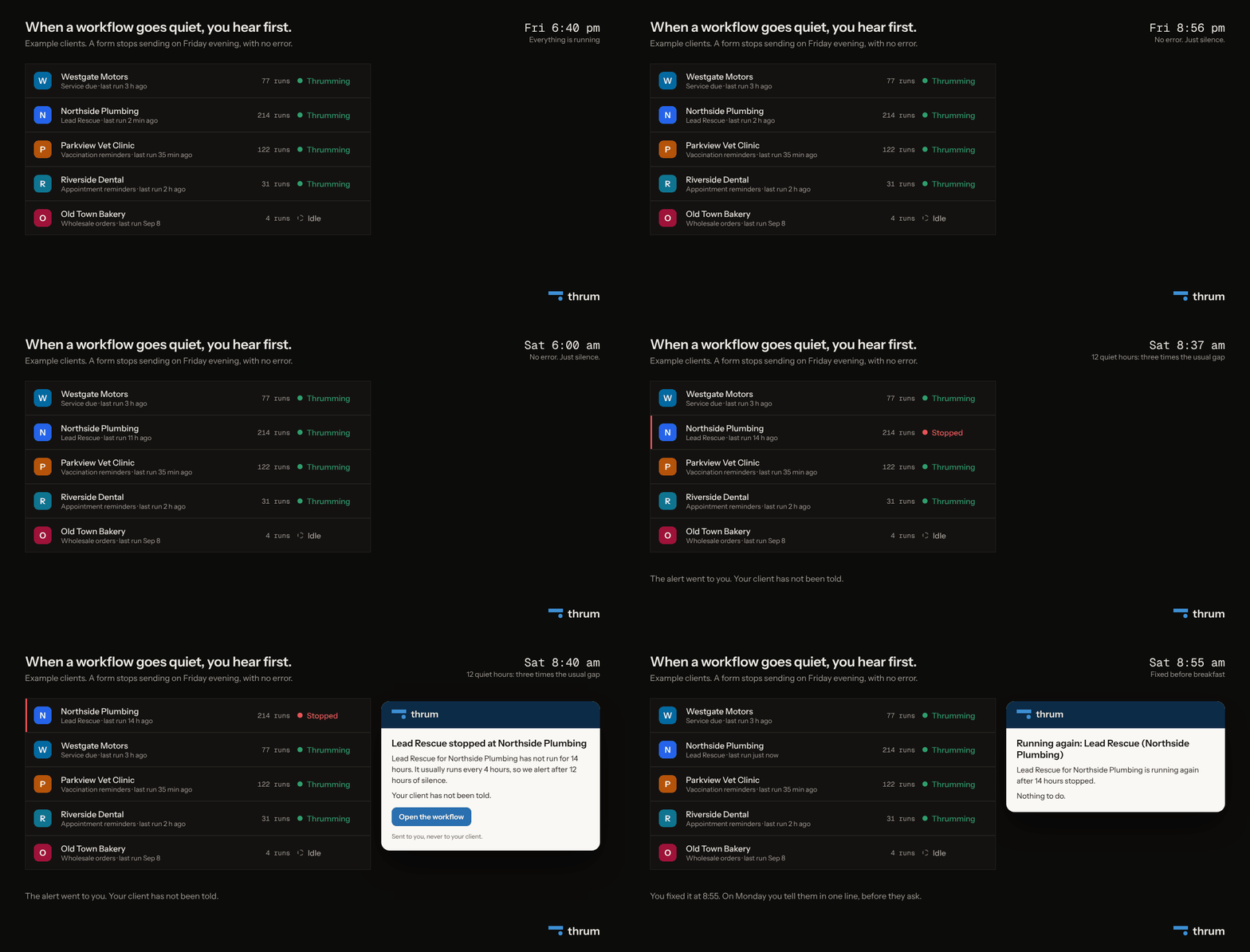
Thrum records each run and learns each workflow's rhythm. After 10 runs it knows what normal looks like. Silence for three times the usual gap moves a workflow to Stopped and sends you an email, never sooner than 6 hours and never later than 7 days. Three failures in a row, a fifth of recent runs failing, or runs three times slower than usual moves it to Degraded. You get a reminder once a day while it stays Stopped, and a note when it recovers.
Stage 7: the report on the 1st
Status: built.
On the first of every month, Thrum sends each client a one-page report in their colours, with four numbers, one chart and one plain sentence. The same month stays in their portal. You get a copy, with one extra line naming any workflow that stopped, had failing runs or ran slowly that month.
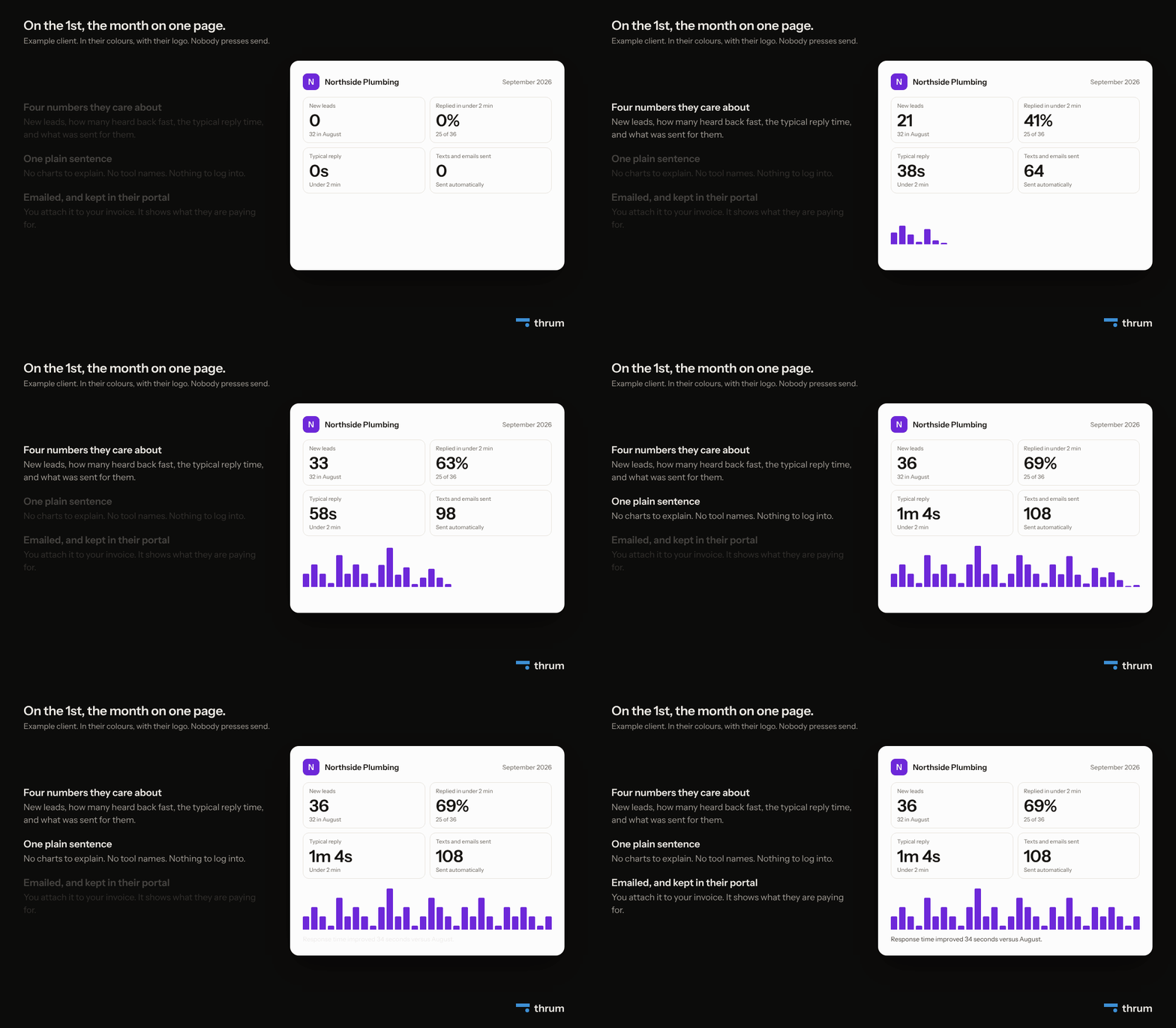
Nobody presses send. If email is not set up yet, nothing is marked as sent, so a re-run after the fix delivers it. Either way, a client never gets the same month twice.
Stage 8: the invoice goes out
Status: in beta, built and not yet run with a client.
Thrum records every text and email a client's workflows send, with its cost and your price. When the month closes, it makes one invoice per client from those lines and sends it from your own Stripe account. A line reads like "Text messages, September 2026: 60 sent at $0.04 each" (example figures). The client gets Stripe's usual email, and a View and pay link appears on that month's page in their portal.
Four things to know before you rely on it.
- It bills usage only. Your own monthly fee is still invoiced the way you invoice it today.
- No client money passes through us, and we take no cut. It is your Stripe account and your key.
- It never bills twice. Each client can be invoiced once per month. If Stripe refuses your key, nothing is sent, you get one email saying what to check, and that client's row on your clients screen shows the problem until an invoice gets through.
- Months under 50 cents are carried into the next one, never dropped.
Then the month turns, and the loop from stage 4 runs again by itself.
What Thrum has not shipped yet
- A fixed-fee line on the invoice. Client invoicing bills texts and emails only.
- Watching automations you already built elsewhere. Thrum runs its own workflows.
Summary
- One place holds the whole client relationship, from the signed proposal to the paid invoice.
- You step in four times: the proposal, the account details, the portal address, and the alert.
- Forms are live. Workflows, health, the portal and the report are built. Proposals, setup and invoicing are built and not yet run with a client.
Solo is $20 a seat a month, and each seat carries one client. Every account starts with a 14-day trial for two clients, with no card.


