
We built Thrum around one observation about automation work for small businesses. The client you lose is the one who finds out about a broken automation before you do.
Things break in every business, and owners know it. What they find hard to forgive is learning that the person they pay every month to watch it was not watching. This post explains why the order of events matters more than the failure, why the failures that matter most never show an error, and how Thrum makes sure you are the first to know.
The same weekend, twice
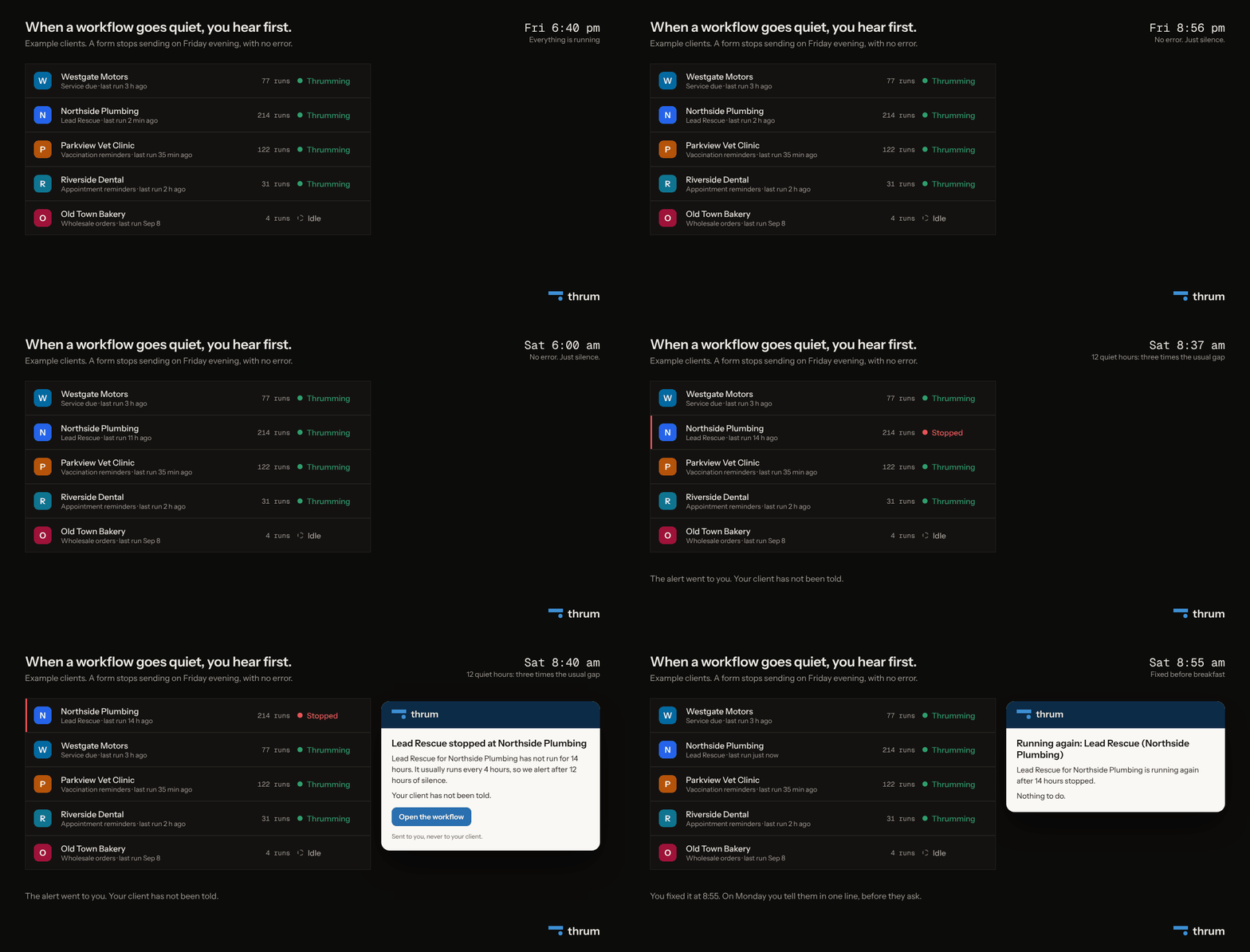
Take an example client, Northside Plumbing. You built them a workflow, a set of steps that runs by itself, called Lead Rescue. When someone fills in the quote form on their website, the customer gets a text back within about a minute (or at 08:00, if they ask overnight) and the owner gets the details on his phone. On a normal week it runs about six times a day. The business, the times and the details here are illustrative.
On Friday at 6:40pm the form stops sending enquiries to the workflow. Maybe someone changed the website and the form came off the page. Maybe a password the automation uses was changed. Whatever the cause, nothing shows an error. No run starts, so no run fails.
Version one. Monday, 9:05am, the owner calls. Two customers told his office manager that nobody got back to them about a quote, and one booked someone else. You check the history and see it last ran on Friday evening. You fix it in fifteen minutes, then spend the rest of the call explaining why the thing he pays you to keep running was off for two and a half days, and why you did not know.
Version two. On Saturday at 8:40am, the alert below arrives in your inbox from Thrum.
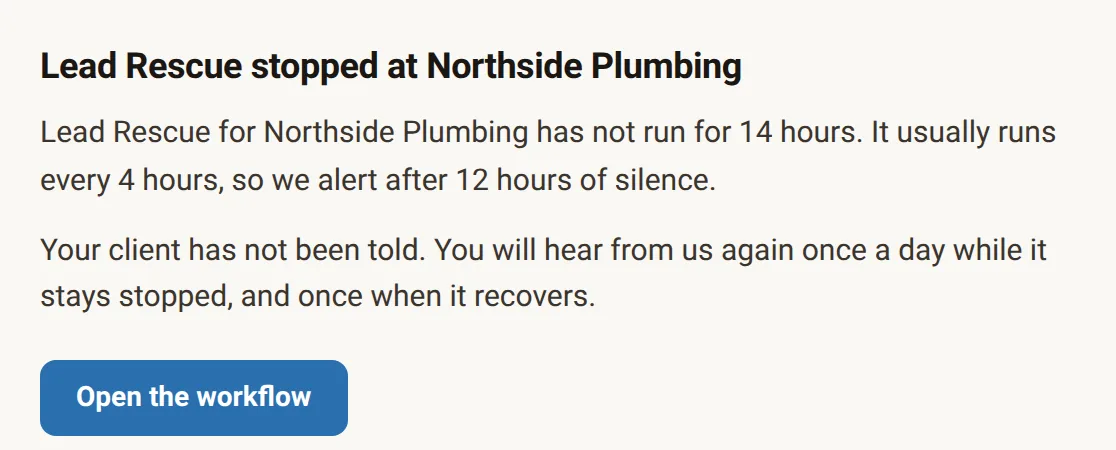
You fix it before breakfast and Lead Rescue goes back to Thrumming (running normally). On Monday you mention it in one line: "Your quote form stopped sending enquiries on Friday evening. I caught it on Saturday morning and it has run normally since."
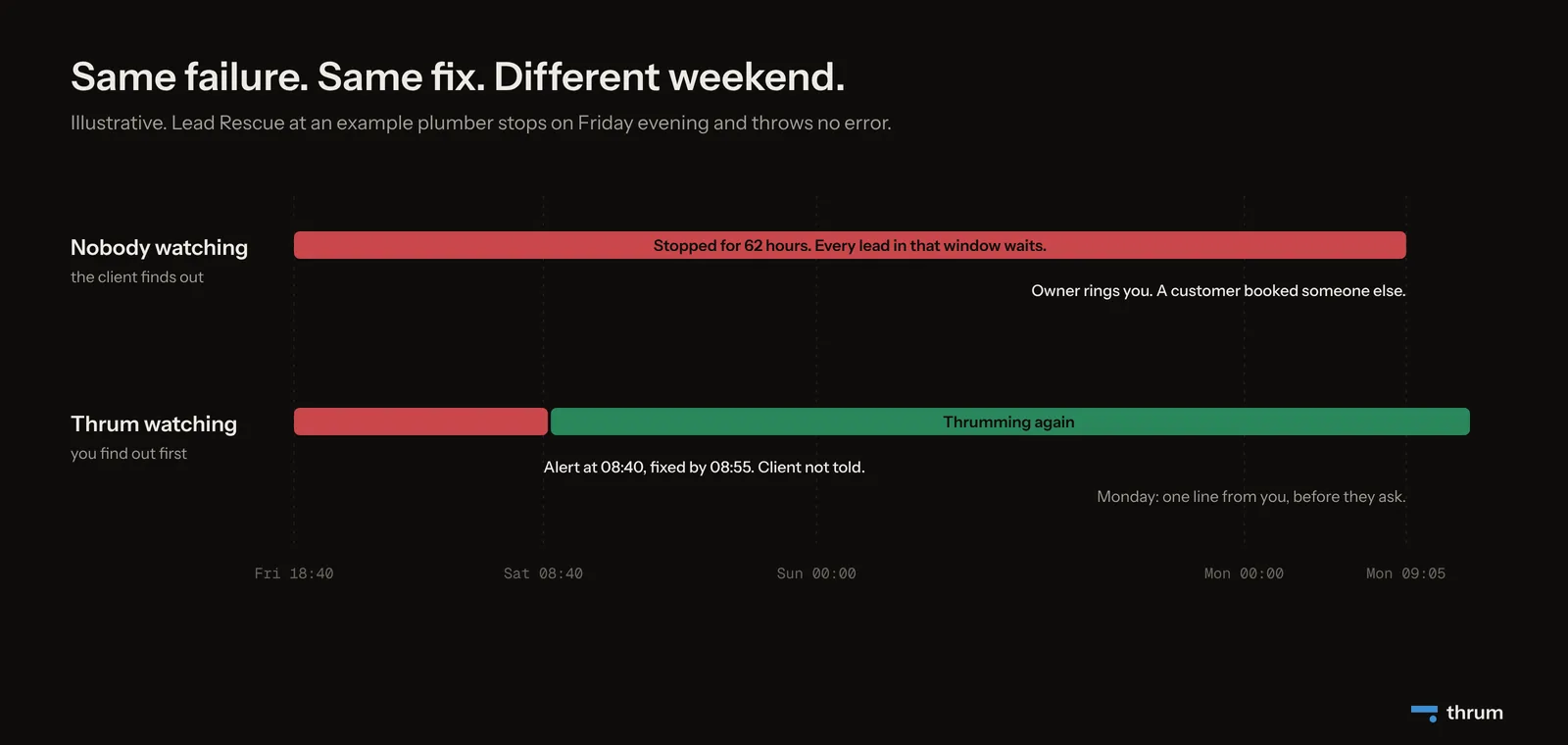
Why the order matters more than the failure
Your clients run businesses where things go wrong each week. The van fails its test, the card machine drops out, a supplier sends the wrong part. They do not expect software to be perfect.
What turns a problem into a lost client is finding out that nobody was watching. When the client spots it first, the question in their head becomes "what else has been off that I do not know about".
A monthly fee is a bet, renewed every month, that you are paying attention when the client is not. Each time they catch a problem before you, the bet looks worse. The cancellation tends to come later, at the next price review, when a cheaper offer arrives, or when they decide to "handle it ourselves for a bit".
In Thrum: this is why the alert goes only to you. Your client is never told about a problem you have not had the chance to fix.
The failures that matter show no error
Most monitoring is built around errors, so a failed step sends you an email. That covers the runs that happen and go wrong. Many of the failures that lose clients are runs that never start, and here are four common ones.
- The automation gets paused during a test and never switched back on.
- A password or access key expires, and the connected app stops sending updates.
- Someone on the client's side takes the form off the website.
- They move to a new booking system, and the link that fed the automation is gone.
In each case the error count is zero. Your inbox is quiet, and a quiet inbox looks like good news. From the outside, silence and a working system look the same, unless something knows what normal looks like.
How Thrum watches for silence
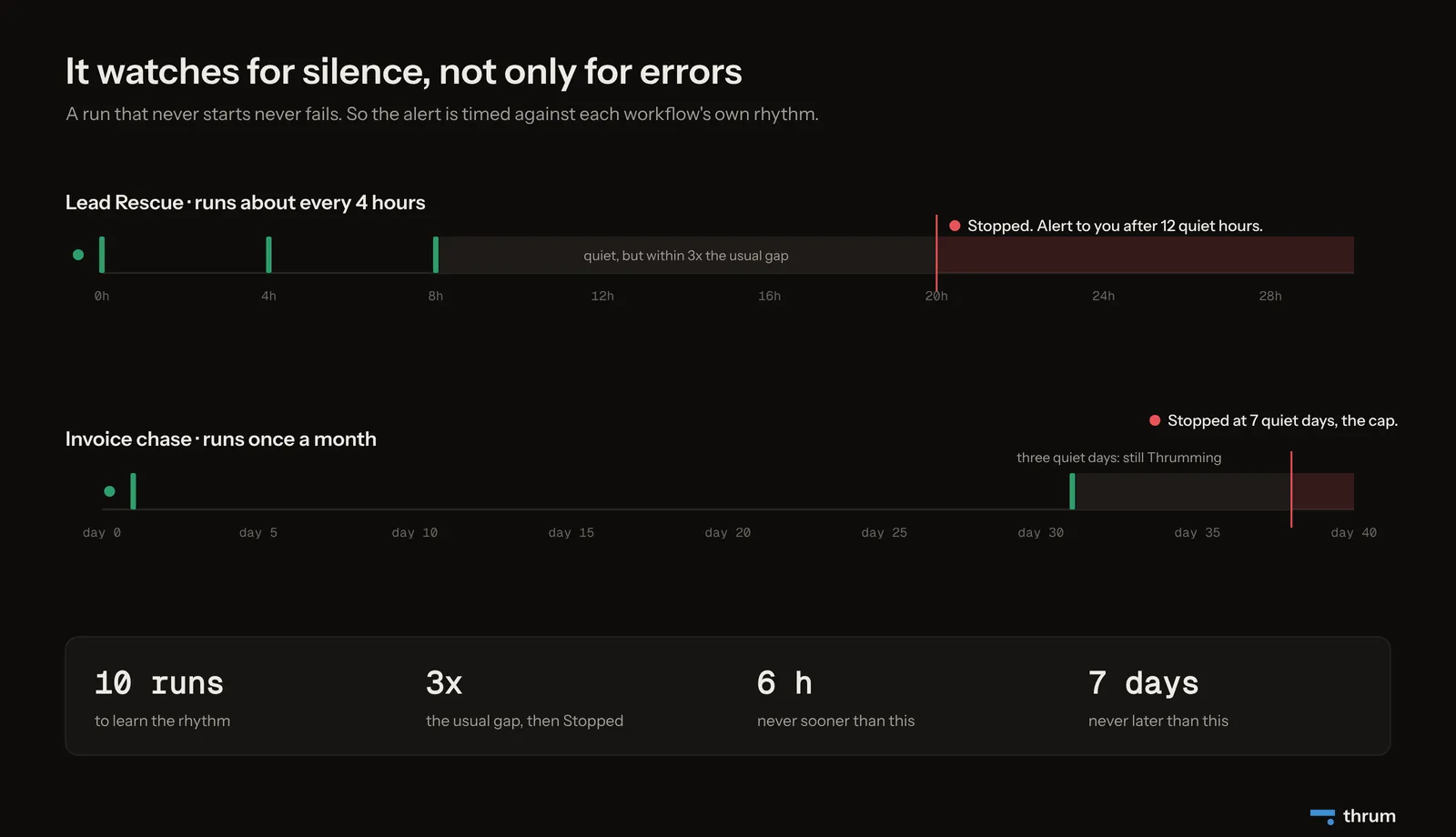
Thrum runs the workflows you build for your clients and records each run. From those runs it learns each workflow's rhythm, meaning how often it runs, how long it takes and how often it fails. After 10 runs it knows what normal looks like.
Then it watches for the gap. Silence for three times the usual gap moves a workflow to Stopped, and you get an email. A workflow with a usual four-hour gap goes Stopped after twelve quiet hours. For a monthly invoice chase, three quiet days is normal, and it stays Thrumming. The alert is never sooner than 6 hours and never later than 7 days. If you know better than the history, you can tell Thrum directly how often a workflow should run.
Thrum also catches the slower kind of trouble. Three failed runs in a row, a fifth of recent runs failing, or runs taking three times longer than usual moves a workflow to Degraded (still running, worth a look today). A workflow with nothing to do yet is Idle, which is not a problem.
If a workflow stays Stopped, you get a reminder once a day. When it recovers, you hear that too, so you know the fix held. On your screen, all your clients sit on one list with anything Stopped at the top, so anything red you see there in the morning is what needs you that day.
Make the good weeks visible too
Hearing first is half of it. The other half is showing the work when nothing is wrong, so the client's picture of you is not built from the one weekend something broke.
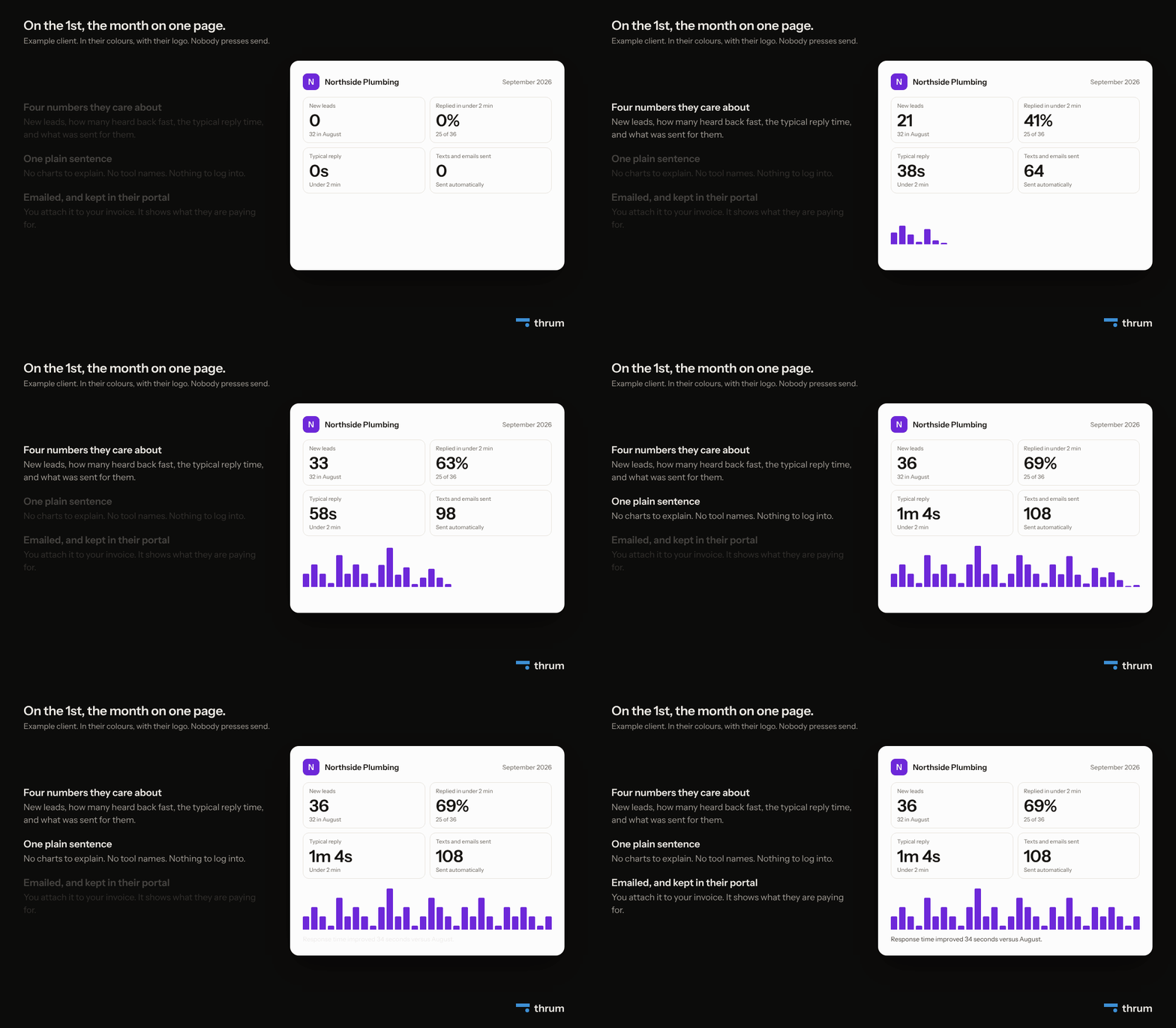
In Thrum: each client gets a portal in their own colours, with their logo. It shows who got in touch, what happened next and how fast they heard back, with no technical words. On Agency and Scale it can sit on your web address or theirs, and our name appears nowhere in it. On the first of each month, a one-page report goes to the client.
The arithmetic
These numbers are illustrative, so swap in your own. Say you look after three clients at $400 a month each. That is $1,200 a month. Lose one of them to a weekend like version one and you lose $4,800 over the next year, before counting the referral they will not give you.
In Thrum, Solo is $20 a seat a month, and each seat carries one client, so those three clients cost $60 a month. Every account starts with a 14-day trial for two clients, with no card.
This week's steps, with or without Thrum
You can start hearing first today with a list and a habit.
- List each workflow you run for a client. One line each: client, workflow, what starts it.
- Write down its normal rhythm. Every few hours, daily, weekly. If you do not know, look at the last 30 days.
- Set a silence limit of roughly three times the normal gap.
- Check the last run against that limit each morning, before email.
- Decide what you tell the client, and when. One plain sentence, after it is fixed, before they ask.
Do that for a month and you will know how often your clients' workflows go quiet, and how much of your morning it costs to check by hand. If the second number is bigger than you like, that is the part Thrum does for you.
What Thrum has not shipped yet
Forms are live today. The portal, the monthly report and the alerts are built and not yet used by any customer. Thrum runs the workflows itself, so it cannot watch automations you already built in Zapier or n8n.
Summary
- The client you lose is the one who notices a problem before you do.
- The failures that matter most are silent, with no run and so no error.
- Thrum learns each workflow's rhythm and alerts you, never the client, when it goes quiet or starts failing.
- The portal and the monthly report make the good weeks visible, so one bad weekend does not define you.


